
From “Equation” to “Equation Group” An Analysis of the Cross-Platform Capabilities of the EQUATION Hacking Group’s Advanced Malware
1 Background
Since February 2015, Antiy has successively published two analysis reports on the Equation Group[1][2], analyzing the composition of its malicious code components targeting the Windows platform, its hard disk persistence capabilities, and its use of encryption algorithms. This report will be the first to publish Antiy’s analysis of some samples of the Equation Group targeting the Solaris and Linux platforms. We can proudly say that this is the first public analysis in the industry to officially confirm the existence of these “evil spirits”. In fact, Antiy’s related work was completed several years ago. Since 2012, Antiy’s analysis engineers have been paying attention to the fact that the super attack group is trying to cover all scenarios that can achieve intrusion and persistence with its payload capabilities. In these scenarios, various server operating systems, such as Linux, Solaris, and FreeBSD, are its most concerned targets. These payloads are not ordinary script trojans, but componentized binary components with rootkit capabilities, strong encryption and anti-analysis capabilities, and strict encrypted communication. Antiy engineers have always referred to attacks launched by similar super attack groups as A2PT, and regard the full platform coverage capability of malicious code payloads as an important feature of the A2PT group. In its report titled “The Scars of the Panda – APT Attacks Encountered in China”[5], presented at the China Cybersecurity Conference in May 2016[3] and the Alibaba Security Summit in July 2016[4], Antiy made a preliminary disclosure of the Equation Group’s multi-platform payload capabilities.
Antiy transformed its long-term experience in tracking and analyzing advanced threats and advanced malware into product capabilities. Through the Persistent Threat Detection System, Antiy assisted users in capturing payload deployments and lateral movement in the network. It used the Intelligent Endpoint Protection System to provide comprehensive protection for traditional Windows hosts and domestic operating systems. It used the Persistent Threat Analysis System to assist users in analyzing malware on multiple platforms. The deployment of these products also enabled Antiy to obtain more threat clues with the support of users. At the same time, Antiy also actively paid attention to open source intelligence and public information, and paid attention to information and trends of related organizations.
After Kaspersky and Antiy successively analyzed and exposed the malware used by the Equation Group at the beginning of last year, the Equation Group resurfaced in a series of “exposés”. In the Equation Group’s attack code targeting various firewalls and network devices leaked in August 2016[6], the public first linked the Equation Group with an attack equipment system called “ANT”, and saw its ability to inject and persist against firewall products such as Cisco, Juniper, and Fortinet. On October 31, 2016, the article “Shadow Brokers reveals list of Servers Hacked by the NSA”[7] was published, which disclosed more documents released by the “Shadow Brokers”, including a list of foreign servers compromised by the Equation Group. The relevant documents claimed that most of the infected servers were running operating systems such as Solaris, Oracle-owned Unix, etc., and some were running FreeBSD or Linux systems. As this information was corroborated by Antiy’s capture and analysis work, a near-complete, all-platform attack capability of this super attack group became increasingly clear.
Our analysis has consistently validated this information. Over the past few years, this analysis has been so lengthy, complex, and difficult that it has exceeded the challenges we faced in analyzing and reproducing Stuxnet and Flame. This highly complex, covert, and versatile advanced malware presents a significant challenge to both victims and analysts. Especially when its attack scope covers almost all architectures and operating systems, traditional security analysis teams, which are relatively more proficient in malware analysis on mainstream operating system platforms such as Windows, Linux, and Android, have felt immense pressure and challenges. If we were to use the organization’s name, “Equation”, as an analogy to describe the difficulty of the analysis, what we need to crack is no longer just a single “equation”, but a much more complex system of multiple equations.
2. Equation Group’s Multi-platform Operational Capabilities
The Equation Group employs an industrial-grade, standardized arsenal of attack weapons. Antiy previously analyzed six of its malware components in a report: EquationLaser, EquationDrug, DoubleFantasy, TripleFantasy, Fanny, and GrayFish. Antiy has also found samples of EquationDrug and DoubleFantasy on other platforms. Information on the Equation Group’s arsenal is shown in the table below:
| Component Name | Multi-platform Features | Component Description | Usage time |
| EquationLaser | Not yet discovered. | The implantation procedure used in the early days of the Equation Group was employed between approximately 2001 and 2003. Compatible with Windows 95/98 systems. | 2001-2003 |
| EquationDrug | Some plugins have been confirmed. | The group used a highly sophisticated attack component to support a module plugin system that could be dynamically uploaded and uninstalled by attackers. It is suspected to be an upgraded version of EquationLaser. | 2003-2013 |
| DoubleFantasy | It has been discovered. | A verification Trojan designed to confirm the target’s identity. If the target is confirmed, the implanted malicious code will escalate to a more sophisticated platform, such as EquationDrug or GrayFish. | 2004-2012 |
| TripleFantasy | It is speculated that it exists. | A fully functional backdoor program, sometimes used in conjunction with GrayFish. It appears to be an upgraded version of DoubleFantasy, possibly a newer verification plugin. | 2012- present |
| Fanny | Not yet discovered. | Created in 2008, Fanny was a worm that spread via USB devices, attacking physically isolated networks and transmitting collected information back to the attackers. Fanny was used to gather information on targets in the Middle East and Asia. Some victim hosts appeared to have been infected with DoubleFantasy, which then escalated into EquationDrug. Fanny exploited two zero-day vulnerabilities that were later applied to Stuxnet. | 2008-2011 |
| GrayFish | Not yet discovered. | The most sophisticated attack component in the Equation Group resides entirely in the registry and relies on a bootkit to execute when the operating system starts. | 2008- present |
Readers can complete the puzzle of the Equation Group’s attacks on multiple operating systems by reading the following reports:
| Information | Windows | Linux | Solaris | Oracle-owned Unix | FreeBSD | Mac OS |
| Antiy: An attack component of the EQUATION organization that modifies hard drive firmware. | Analysis of sample payload and disk persistence capabilities | |||||
| Antiy: Analysis of Encryption Techniques in Some Components of Equation | Analysis of encryption algorithms | |||||
| Antiy: Analysis of the EQUATION attack group’s full-platform payload capabilities (this report) | Exposure exists; analyze relevant payloads. | Analysis phase load | ||||
| The Hacker News: “Shadow Brokers reveals list of Servers Hacked by the NSA” | Exposure exists | Exposure exists | Exposure exists | |||
| Kaspersky: Equation: The Death Star of Malware Galaxy[8] | Unveiling the Equation Attack Organization | |||||
| Kaspersky: A Fanny Equation: “I am your father, Stuxnet”[9] | Fanny Component Analysis | |||||
| Kaspersky: Equation Group: from Houston with love [10] | Doublefantasy Analysis | |||||
| Kaspersky: EQUATION GROUP: QUESTIONS AND ANSWERS [11] | Equation Organization Questions and Answers | Based on network characteristics, make inferences. |
Note: Antiy’s analysis of the User Agent in the Solaris sample has the Solaris identifier, while Kaspersky disclosed in “EQUATION GROUP: QUESTIONS AND ANSWERS” [11] that it had captured information about the User Agent of Mac OS X. Therefore, although Antiy and Kaspersky and other vendors have not yet captured Mac OS X samples, the Equation Group’s attack payloads against MAC OS X are real.
3. Partial Load Analysis of X86 Linux
Antiy has captured and analyzed the DoubleFantasy component on Linux. This component is an attack sample from the Equation Group used on the Linux platform for preliminary reconnaissance and detection of intended targets. Because it is a sample from the Linux platform, the technical details of its specific functional implementation differ from the Windows samples we previously exposed.
3.1 DoubleFantasy – The Precursor Module for Reconnaissance and Detection
3.1.1 File Tags
| Virus Name | Trojan/Linux.DoubleFantasy |
| Original Filename | ████████ |
| MD5 | ███████████████ |
| Processor Architecture | x86 ( 32 -bit platform) |
| File Size | ████████ |
| File Format | BinExecute/ELF |
| Timestamp | N/A |
| Digital Signature | None |
| Packing Type | None |
| Compiled Languages | C language |
3.1.2 Operation Process
The Trojan/Linux.DoubleFantasy sample executes in two ways: with parameters and without parameters. When the parameter ‘-c’ is present, it is only used to obtain system information and can be regarded as a scene reconnaissance function. Its process is as follows:
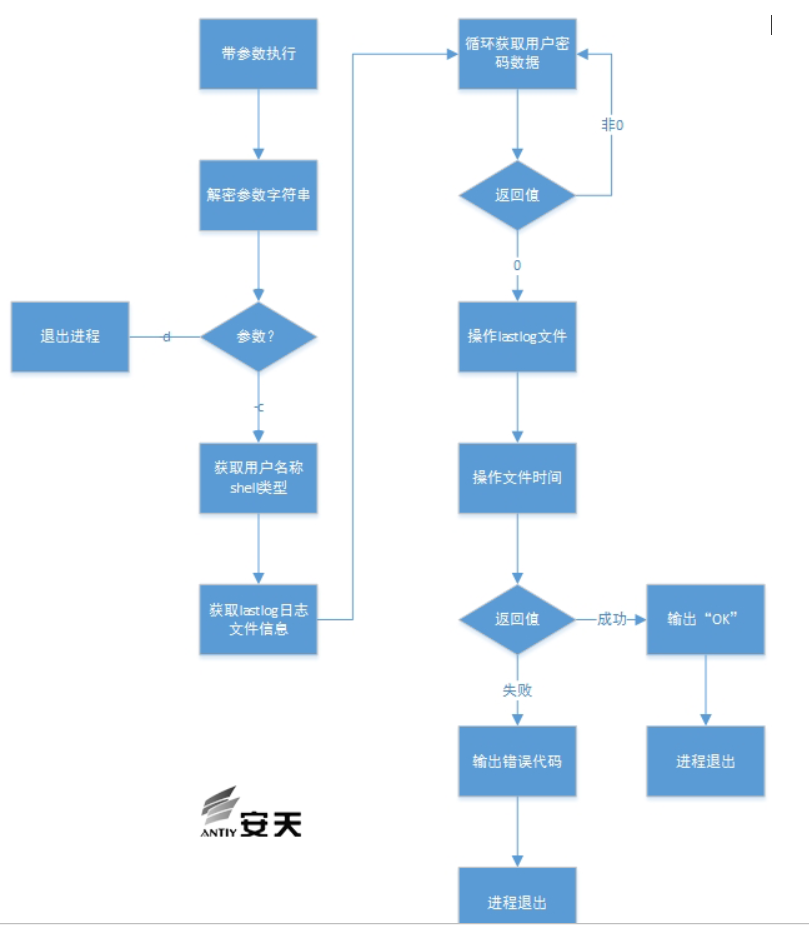
Figure 1 Trojan/Linux.DoubleFantasy – C Parameter Flow
If the sample is run without parameters, it will exhibit network communication behavior, as follows:
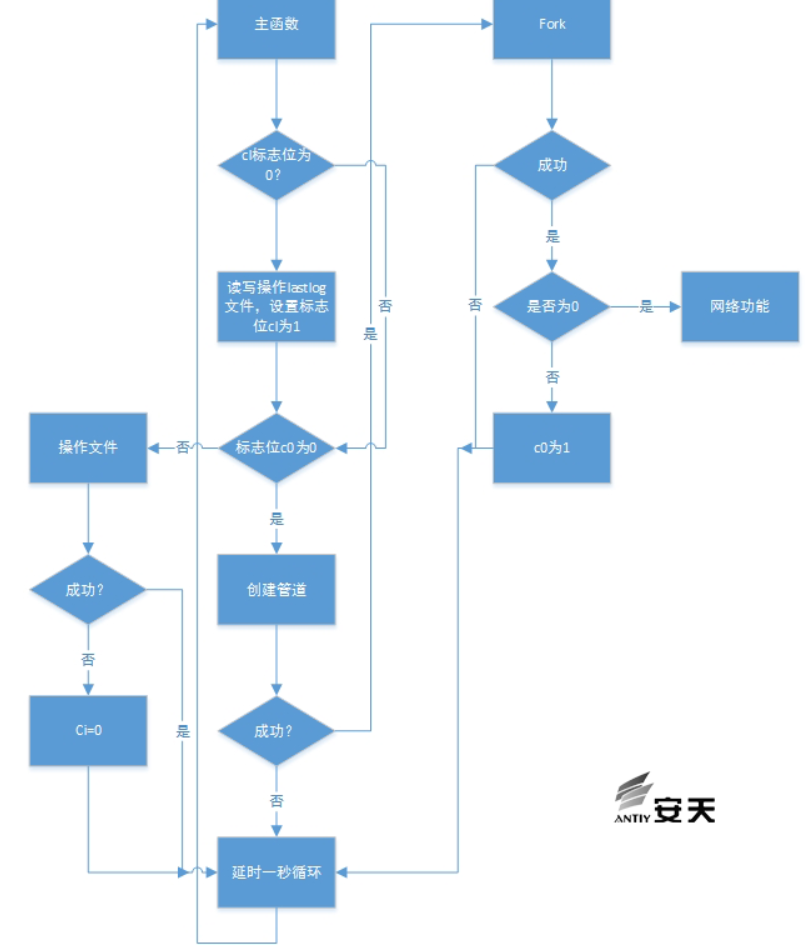
Figure 2 No-Parameter Execution Flow of Trojan/Linux.DoubleFantasy
3.1.3 Basic Functions
Iterate through system files, clear /var/log/lastlog records, and retrieve system account password information.
Connect to Google to determine network connectivity.
Connect to a remote server and perform different operations based on remote control commands.
The sample also contains multiple information encryption algorithms and network communication encryption algorithms.
The sample will launch itself using a link file; the proc/%d/exe file points to the sample’s own file.
After the sample runs, three consecutive PID threads will be started.
The sample collection then gathered information from the infected machine, including system directories and file extensions. See the image below:
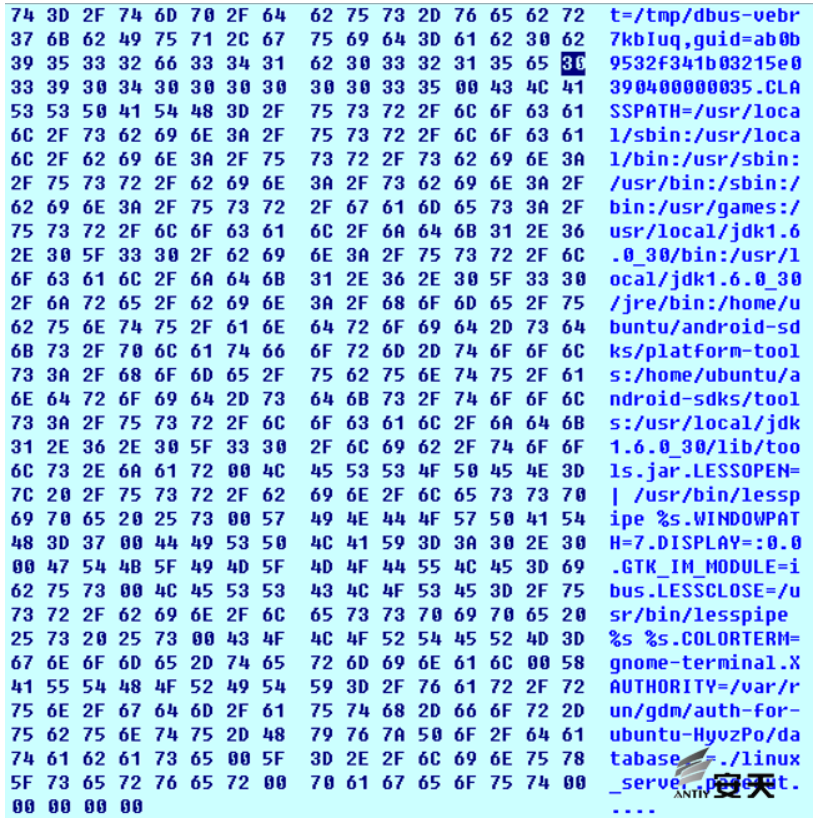
Figure 3 Collecting Information from Routine Systems
The malicious code starts forking a process and checks the PID of the child process to determine if execution was successful. If execution is successful, the main process exits, making debugging impossible and affecting the debugging process, as shown in the following figure:
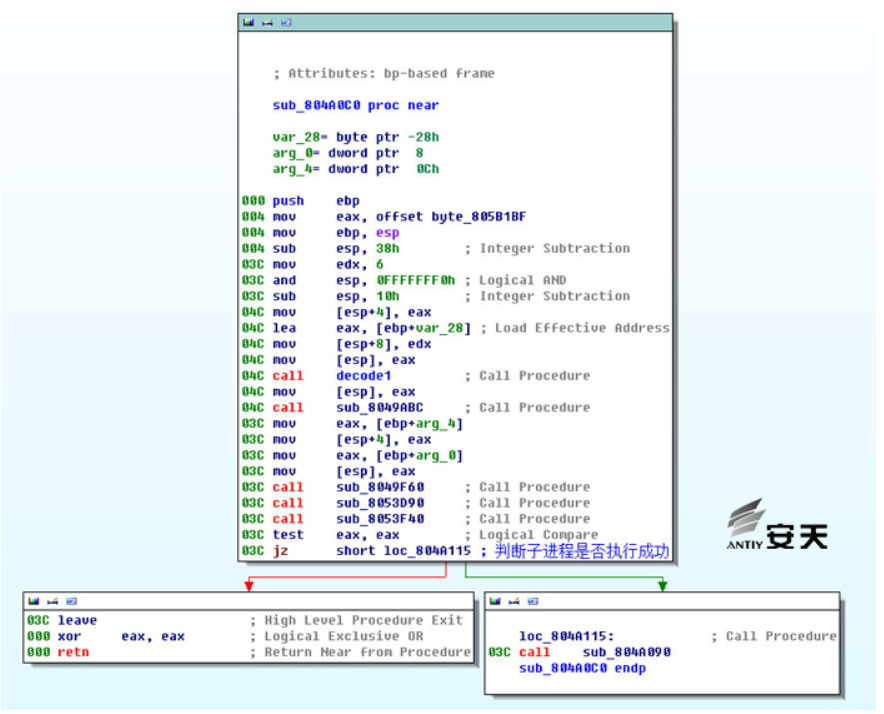
Figure 4 Subprocess Judgment
Decrypt various strings to obtain user information, including system version, etc.
Get user login information getpwnam.
View the files /bin/fast /sbin/login /usr/sbin/nologin.
Get the user’s login password getpwuid.
Read user logs var/log/lastlog.
3.1.4 Dynamic Loading of Functions and Data
The functions and data called in this sample are dynamically loaded and invoked, requiring dynamic debugging during analysis. Through analysis, we decrypted the function call addresses using dynamic analysis, as shown in the following figure:
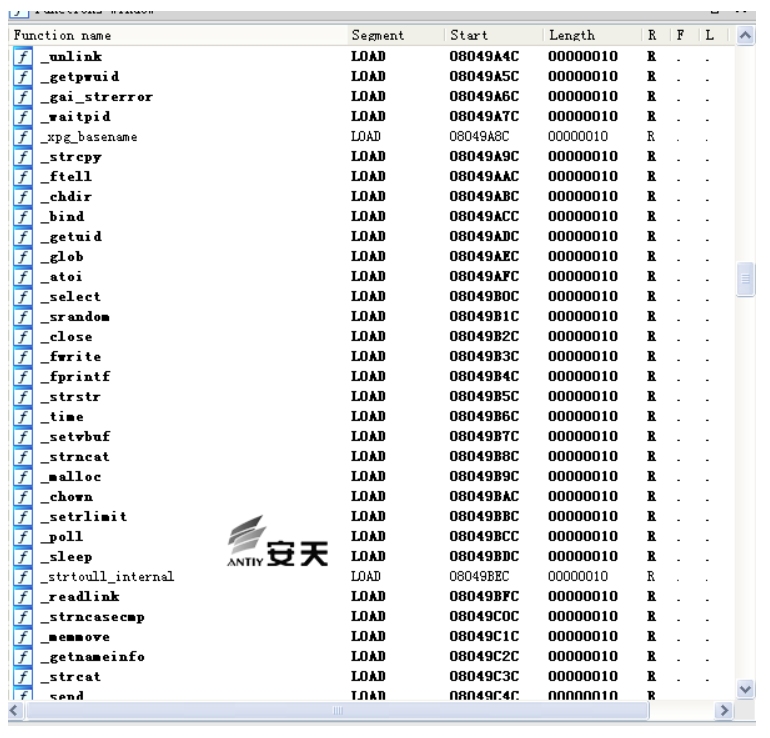
Figure 5 Function Call Address
3.1.5 String Decryption Analysis
The sample uses a custom encryption algorithm to encrypt the string information it contains. This algorithm was called 115 times. The encryption algorithm is as follows:
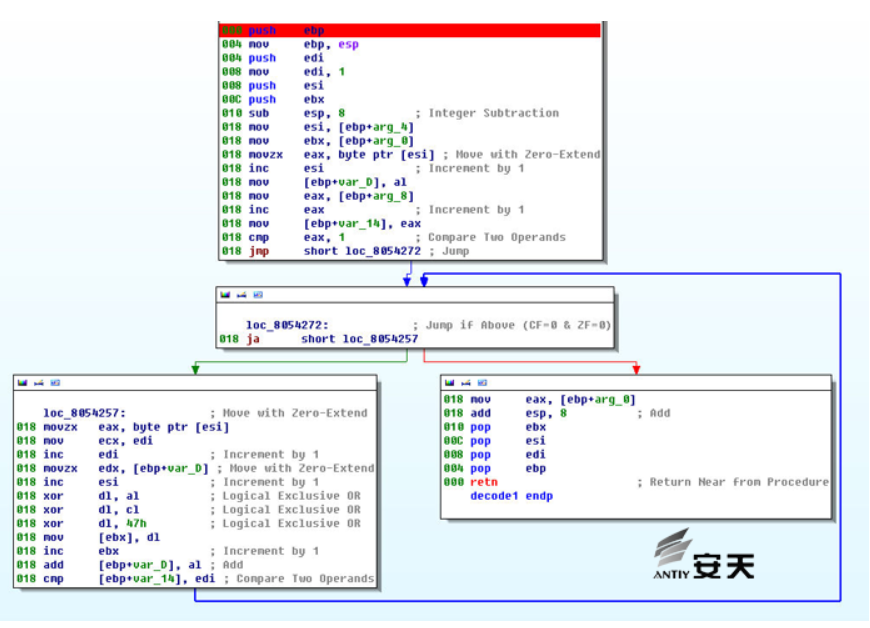
Figure 6 Linux Sample String Encryption Algorithm
3.1.6 Network Communication Encryption
When the DoubleFantasy Linux sample communicates over the network, the 16-bit key hardcoded into the sample is identical to the 16-bit key used by the DoubleFantasy Windows sample to encrypt registry-related data:
66 39 71 3c 0f 85 99 81 20 19 35 43 fe 9a 84 11
The subkey generated after calculation is:
E9 BE CD E0 A8 9F 4D DB C3 42 AC 2B 24 77 AB CB 5A C1 52 F8 5B 3E F0 78 CB 01 0A 69 29 8F 85 8C 03 9C 7C EF 5E 36 0E 8B C0 40 76 28 9C 9C F2 24 81 9D 02 72 4F 6A BB B5 5B 42 73 14 88 F2 73 75 8B F9 37 98 3B 9F 64 2B A3 C4 FF C7 8A 40 67 C1 25 9F 65 54 45 36 48 FF E2 86 05 1A F4 94 AC 2B 08 D5 E5 83 BE 2C AD EE D0 A6 98 CB 8D 35 ED EE C4 F0 8C F2 CD BA 87 03 54 27 3D 13 A7 9B 6A 05 C7 02 30 21 05 67 58 3B E6 A1 44 0A 37 16 3C 86 E9 BC 8B 20 1A 98 7E 28 E6 7F F7 CA F7 9E 38 31 7F F0 2F 93 11 2B 28 F0 FF 11 B7 FC 1C 63 86 CB
The custom algorithm used in the Linux sample is the same as that used in the Windows sample, but only one encryption key is used (because the Linux system does not have a registry, so there is no registry encryption function). This key is the same as the key used to encrypt data in the registry on the Windows platform (the Windows platform has two sets of keys, one registry key and one network communication key). As can be seen from the figure below, the secondary key change algorithm is the same for both platforms (for the specific algorithm, please refer to the Windows encryption algorithm analysis section).
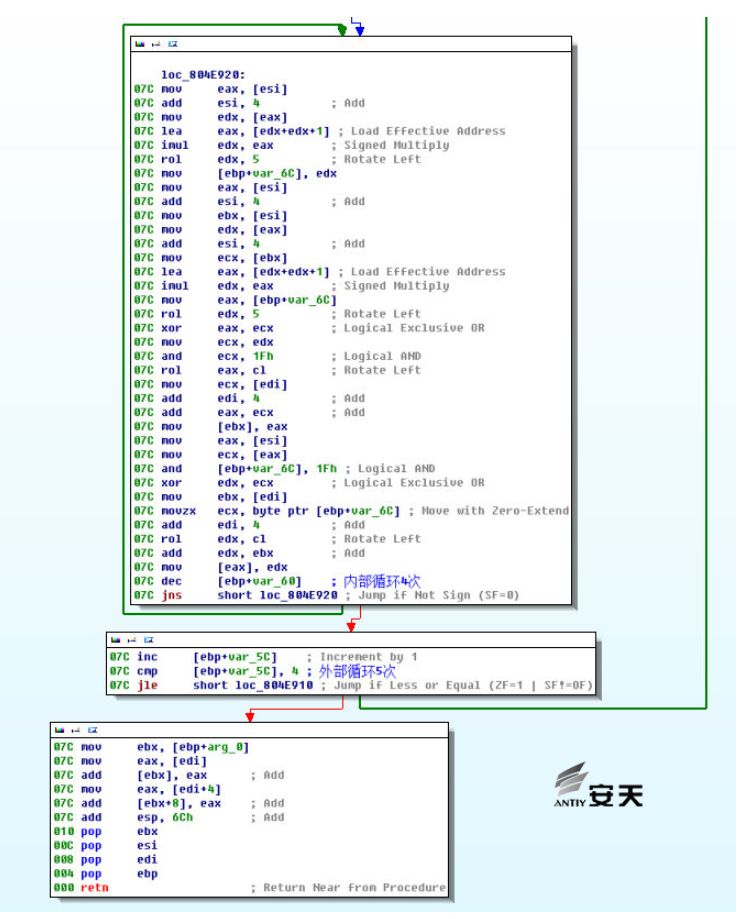
Figure 7 Second-Level Key Transformation Algorithm
3.1.7 Network Control Commands
The instruction branch section of the Linux sample is basically the same as the Windows section analyzed in Antiy’s previous report. The Linux sample has a total of 9 branch instructions, and their functions are roughly the same. The instruction codes are: 0x4A, 0x4B, 0x60, 0x70, 0x75, 0x76, 0x78, 0x79, and 0x80.
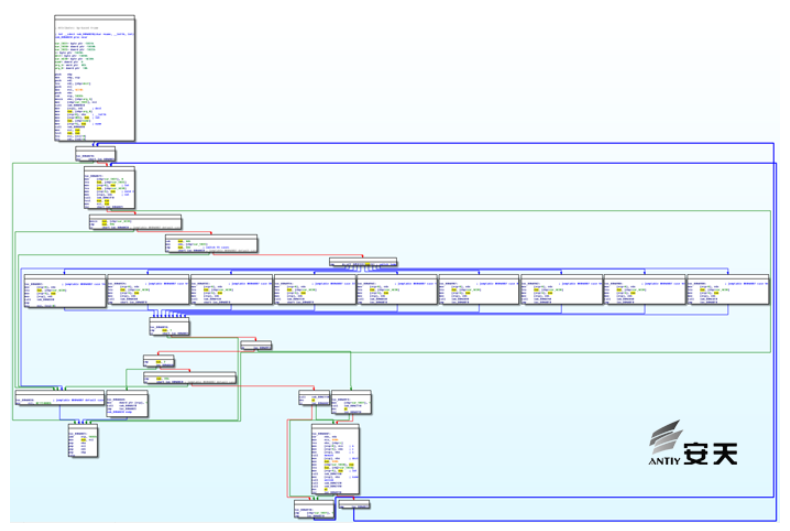
Figure 8 Instruction Branch Code of the Linux Sample
The Linux sample is functionally identical to the Windows sample in terms of instructions, with only minor differences in obtaining system information. The information format obtained by the Linux sample is shown in the figure.
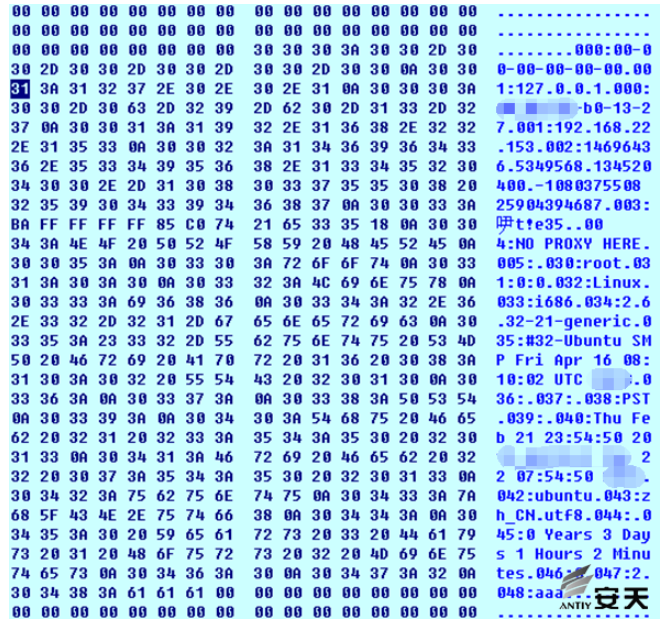
Figure 9 Linux Sample Information Format
Information Format Instructions:
| Label | Illustrate | Label | Illustrate | Label | Illustrate |
| 000 | MAC address | 033 | Platform type such as (i386/i686) | 042 | Operating system (Ubuntu) |
| 001 | IP address | 034 | System kernel version | 043 | Regional language (zh_cn.utf8) |
| 002 | Sample version number | 035 | Operating system type time | 044 | Unknown |
| 003 | Sample clsid | 036 | Unknown | 045 | System uptime |
| 004 | Proxy settings information | 037 | Unknown | 046 | Unknown |
| 005 | Unknown | 038 | PST | 047 | Unknown |
| 030 | Username | 039 | Unknown | 048 | Sample name |
| 031 | Password | 040 | Time | ||
| 032 | Operating system type (e.g., Linux ) | 041 | Time |
4. SPARC Architecture Solaris Scenario Capabilities
The Equation Group may have created the first malicious code with rootkit properties under the SPARC architecture[9] and provided cover for the Solaris[10] version of DoubleFantasy.
4.1 Solaris System and SPARC Architecture
Solaris is a computer operating system developed by Sun Microsystems, employing either the SPARC or x86 architecture. It is primarily used on workstations and servers. Malicious code on the Solaris platform is relatively rare. According to Antiy statistics, even including the earlier SUN OS era, the number of binary compiled malicious code variants does not exceed 60, and almost all of them are based on the x86 platform.
SPARC stands for “Scalable Processor Architecture”, a type of RISC microprocessor architecture. Its instruction set differs significantly from x86, and it has its own unique features such as windows, delay slots, and procedure calls.
Computers with SPARC architecture are generally used in industrial, aerospace, and scientific research fields; their use in data centers and general IT scenarios is relatively rare.
4.2 Rootkit Hidden Module
This module is a rootkit program for the Solaris platform based on the SPACR architecture. Like other rootkit programs, it is primarily responsible for hiding the main function sample file, as well as related derived files and itself, including process, file, and service information. It first runs on the target machine, detects the target machine’s system environment, configuration information, network status, and hides the specified files and processes.
4.2.1 File Tags
| Virus Name | Trojan[Rootkit]/Solaris. Equation |
| Original Filename | ████████ |
| MD5 | ███████████████ |
| Processor Architecture | SPARC ( 32 -bit platform) |
| File Size | ████████ |
| File Format | BinExecute/ELF |
| Timestamp | N/A |
| Digital Signature | None |
| Packing Type | None |
| Compiled Languages | C language |
4.2.2 Sample Main Function
The sample contains 249 functions. The figure shows the main function flow of the sample. Some functions are relatively complex, and there are also various encrypted data inside the sample.
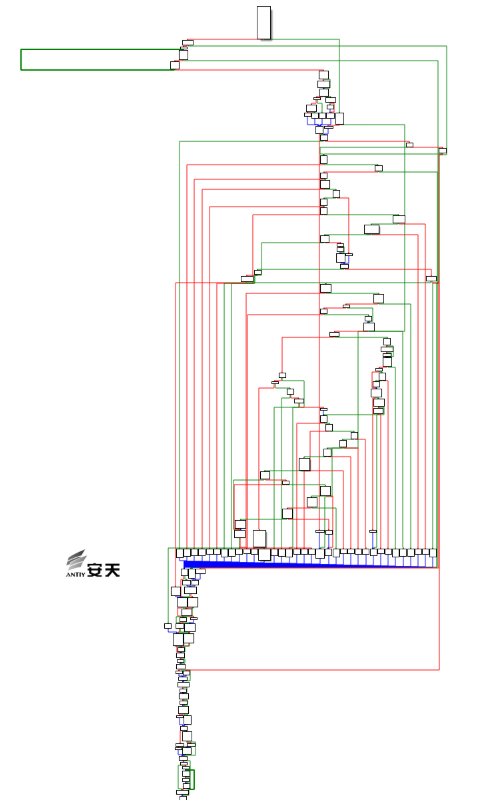
Figure 10 Sample Main Function
4.2.3 Derivative File Names and Paths
After the sample runs, it generates a filename based on the combination of two sets of strings configured internally, uses it as its new filename, and copies itself to the /sbin/ directory.
| String 1 | String 2 |
| audit | admr |
| boot | agent |
| cache | conf |
| core | client |
| cron | info |
| init | mgr |
| inet | statd |
| filesys | serv |
The table above shows that these words are frequently used words or prefixes/suffixes in system files and commands. Therefore, the sample file names are carefully constructed and highly deceptive; even a typical administrator would hardly notice anything amiss if they were placed in a system file.
4.2.4 Startup Script
The sample uses a service to achieve startup at boot. A script (S85s%) is created in the etc/rc.d/ directory. This script will be run as a service to be executed at boot with the start parameter.
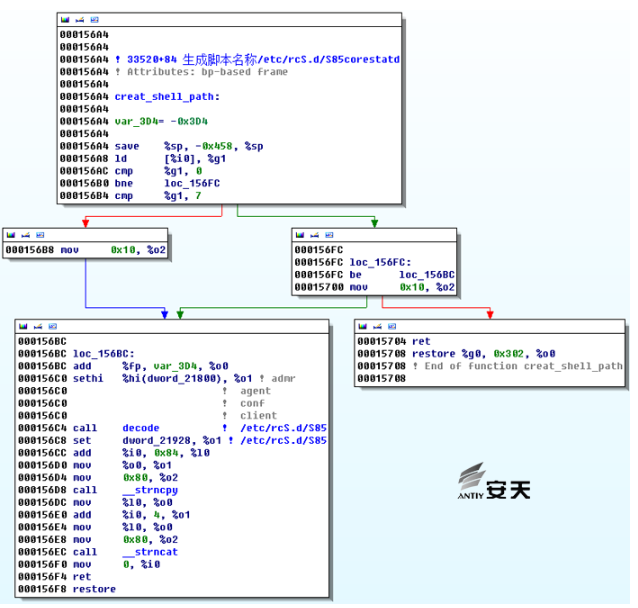
Figure 11 Service Script
The contents of the S85s% file are encrypted. When the sample runs, it calls its own function to decrypt the file, modifies the filename variable, and then writes it to the /etc/rc.d/ directory (the %E part in the image below will be modified to the sample’s own path).
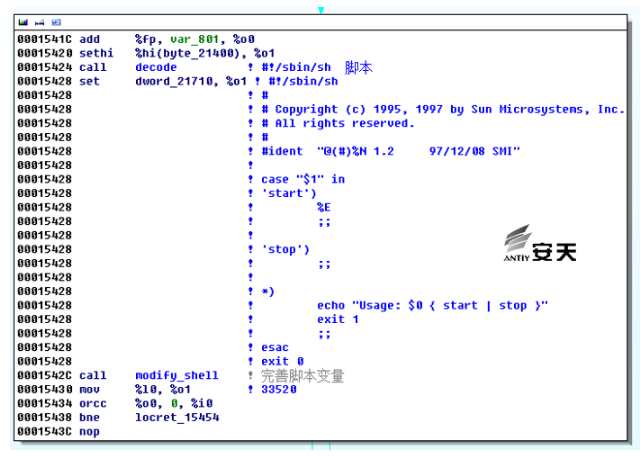
Figure 12 Decrypted Script Content
4.2.5 Hiding Directories and Files
The sample generates an MD5 hash based on the target machine’s HOSTID, then performs a base64-like algorithm on the MD5 hash, takes the first 6 characters, concatenates the .tmp file with these 6 characters to form the folder name, and then creates the folder.
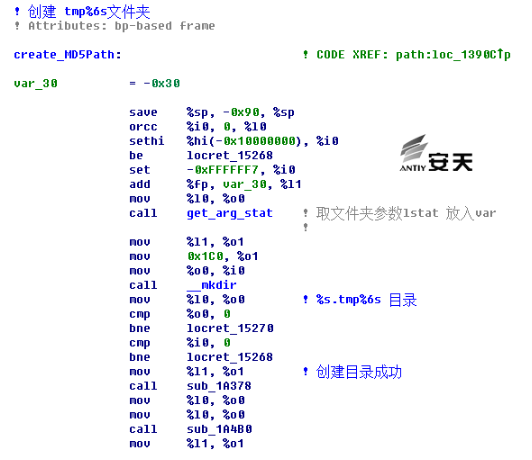
Figure 13 Folder Name for Sample Creation
The sample will also copy other files to this folder for execution based on the running parameters, and will be responsible for hiding all files in this folder.
4.2.6 Version Judgment
The sample uses the uname function to determine that the system is not a sun4m or sun4d version. By reading the /dev/ksyms file, it determines the system architecture: i386, ia64, sparc, sparcv9, confirming that it is a SPARC architecture and that the release version must be 5.1.
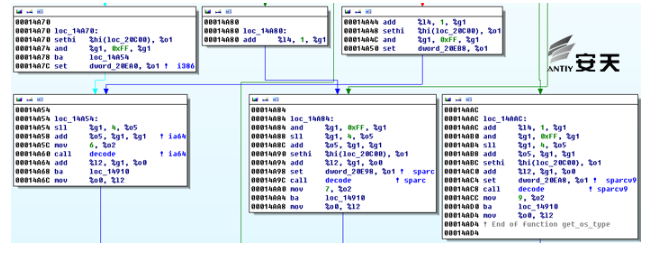
Figure 14 Version Judgment
4.2.7 Encrypting Configuration Data
The sample contains multiple encryption algorithms, one of which is called multiple times. We analyzed and decrypted its data.
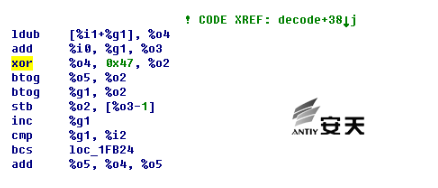
Figure 15 Encryption Algorithm
Decrypted encrypted data:
| Offset | Plain Text | Offset | Plain Text |
| 0x10cd0 | /platform/%s/kernel/sparcv9/unix | 0x11830 | mgr |
| 0x10cf8 | /var/sadm/i | 0x11838 | statd |
| 0x10d28 | SUNW | 0x11840 | serv |
| 0x10d30 | /var/sadm/patch/%s/README.%s | 0x11848 | svcd |
| 0x10d50 | var/sadm/pkg/%s/pkginfo | 0x11851 | \ |
| 0x10d70 | PATCHLIST | 0x11855 | \W |
| 0x10d80 | /var/sadm/pkg/%s/pkginfo | 0x11859 | \O |
| 0x10da0 | PATCH_INFO | 0x1185d | \G |
| 0x10db8 | Requires: | 0x11861 | \w |
| 0x10dc8 | Ob | 0x11865 | \o |
| 0x10dcc | !8I秨; | 0x11869 | \g |
| 0x10dd8 | Incompatibles: | 0x1186d | \ |
| 0x10df0 | module_main | 0x11871 | \ |
| 0x10e10 | %s/%s | 0x11878 | audit |
| 0x10e18 | date | 0x11880 | boot |
| 0x10e20 | /etc/mnttab | 0x11888 | cache |
| 0x10e38 | swap | 0x11890 | core |
| 0x10e40 | tmpfs | 0x11898 | cron |
| 0x10e48 | ro | 0x118a0 | init |
| 0x10e50 | noexec | 0x118a8 | inet |
| 0x10e60 | D | 0x118b0 | filesys |
| 0x10e68 | sun4m | 0x118c0 | key |
| 0x10e70 | sun4d | 0x118c8 | NTP |
| 0x10e78 | sparc | 0x118d0 | root |
| 0x10e80 | /dev/ksyms | 0x118d8 | sys |
| 0x10e98 | sparc | 0x118e0 | rpcd |
| 0x10ea0 | i386 | 0x118e8 | vol |
| 0x10ea8 | sparcv | 0x11940 | / |
| 0x10eb8 | ia64 | 0x11948 | /usr/bin/ |
| 0x10ec0 | sparc | 0x11958 | /bin/ |
| 0x10ec8 | SunOS | 0x11960 | /sbin/ |
| 0x10ed0 | Generic | 0x11970 | var/tmp/faipprep001 |
| 0x10ee0 | boothowto | 0x11990 | init |
| 0x10ef8 | /dev/ksyms | 0x11998 | fini |
| 0x10f08 | /dev/kmem | 0x119a0 | minit |
| 0x116d0 | /var/tmp/ | 0x119a8 | fini |
| 0x116e0 | /lib/ | 0x119b0 | mdata |
| 0x116e8 | /dev/ | 0x119b8 | priocntlsys |
| 0x116f0 | /etc/ | 0x119c8 | /dev/ksyms |
| 0x116f8 | / | 0x119d8 | init |
| 0x11700 | %s.tmp%6s | 0x119e0 | /dev/kmem |
| 0x11710 | #!/sbin/sh | 0x119f0 | /dev/mem |
| 0x11800 | admr | 0x11a00 | /proc/self |
| 0x1180a | NCk | 0x11a10 | .got |
| 0x11810 | conf | 0x11a18 | .got |
| 0x11818 | client | 0x11a28 | .got |
| 0x11828 | info | 0x11a30 | GLOBAL_OFFSET_TABLE_ |
4.2.8 Decrypt and Execute Other Code/Samples
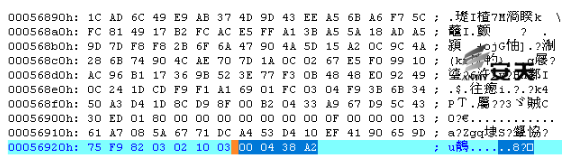
The sample adds encrypted data to the end of the file. After execution, the size of the encrypted data is determined by the data at the end. The data is then parsed and read according to a defined format. After decryption, it is speculated that the data will be loaded and executed.
4.3 DoubleFantasy’s Sparc Architecture Module
This sample is functionally similar to the Windows and Linux platform samples, with the main differences being in CPU architecture, assembly instructions, configuration information storage location, and system information retrieval.
4.3.1 File Tags
| Virus Name | Trojan/Solaris.DoubleFantasy |
| Original Filename | ████████ |
| MD5 | ███████████████ |
| Processor Architecture | SPARC ( 32 -bit platform) |
| File Size | ████████ |
| File Dormat | BinExecute/ELF |
| Timestamp | N/A |
| Digital Signature | None |
| Packing Type | None |
| Compiled Languages | C language |
4.3.2 Basic Functions
Initialize strings and dynamic arrays, and decrypt internal configuration information.
Connect to Google or Yahoo URLs to determine network connectivity.
Connect to a remote URL address. The sample collects host information and sends it back to the remote address, then waits for instructions from the remote host.
It has the function of reading system account password files, which can steal user and password information.
The sample internally runs in daemon mode, which can achieve self-protection and prevent it from being terminated.
This sample uses multiple encryption algorithms to encrypt string information.
It retrieves a large amount of system information and sends it back to the server (such as computer name, IP address, process information, account information, etc., detailed analysis can be found later in this chapter).
The network command section has 7 network commands, which are functionally the same as the Windows version. They can be used to perform corresponding command operations on the computer. The detailed functions of the corresponding commands will be analyzed in detail later in this chapter.
4.3.3 Encryption of Configuration Information
Since the Solaris system does not have the Windows registry, the configuration data of this sample is directly decrypted and used. One of the decryption algorithms is as follows, and the decryption function is called 63 times in total.
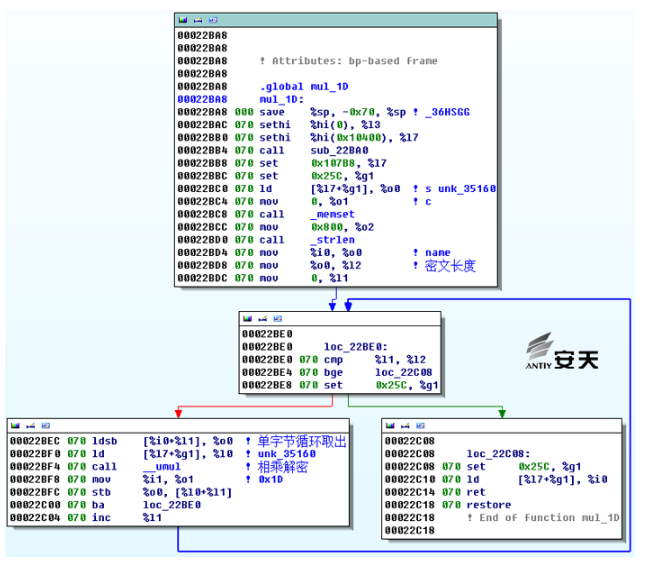
Figure 16 String Decryption
See the table below for the decrypted string information:
| Offset | Plain Text | Offset | Plain Text |
| 0x1346c | ‘200 Connection established’ | 0x13560 | ‘Content-Length:’ |
| 0x13470 | ‘200 OK’ | 0x13458 | ‘Content-Length: %d’ |
| 0x133fc | ‘days’ | 0x13460 | ‘Content-length: %d’ |
| 0x13400 | ‘hrs’ | 0x13488 | ‘Cookie: %s’ |
| 0x13540 | ‘HTTP/1.1\r\n’ | 0x13554 | ‘GET ‘ |
| 0x1340c | ‘ logged in’ | 0x13544 | ‘Host: ‘ |
| 0x13404 | ‘mins’ | 0x13474 | ‘HTTP/’ |
| 0x13408 | ‘total’ | 0x13478 | ‘HTTP/1.0 200 OK’ |
| 0x133f4 | ‘yrs’ | 0x13534 | ‘http://’ |
| 0x133d8 | ‘”‘ | 0x13384 | ‘I_MASK’ |
| 0x13584 | ‘%02x-%02x-%02x-%02x-%02x-%02x’ | 0x133ec | ‘LANG’ |
| 0x13594 | ‘%u.%u.%u.%u’ | 0x133f0 | ‘LANGUAGE’ |
| 0x134dc | ‘/.mozilla/’ | 0x133c0 | ‘LD_PRELOAD=’ |
| 0x134e0 | ‘/.mozilla/firefox/’ | 0x13418 | ‘M_MASK’ |
| 0x134c4 | ‘/.netscape’ | 0x133e4 | ‘MACHTYPE’ |
| 0x13438 | ‘/bin/false’ | 0x134b4 | ‘network.proxy.http’ |
| 0x13520 | ‘/bin/false’ | 0x134b8 | ‘network.proxy.http_port’ |
| 0x1338c | ‘/dev/null’ | 0x134bc | ‘network.proxy.ssl’ |
| 0x133b0 | ‘/dev/null’ | 0x134c0 | ‘network.proxy.ssl_port’ |
| 0x134c8 | ‘/preferences.js’ | 0x1348c | ‘p’ |
| 0x134cc | ‘/prefs.js’ | 0x133b8 | ‘PATH’ |
| 0x13428 | ‘/proc’ | 0x133bc | ‘PATH=’ |
| 0x1343c | ‘/sbin/nologin’ | 0x1355c | ‘POST’ |
| 0x13524 | ‘/sbin/nologin’ | 0x13410 | ‘process info:’ |
| 0x13390 | ‘/tmp/’ | 0x1354c | ‘Proxy-Connection: close\r\n’ |
| 0x133b4 | ‘/tmp/’ | 0x134d8 | ‘S’ |
| 0x135a0 | ‘@C\xe3\xc0’ | 0x1353c | ‘S’ |
| 0x13558 | ‘\r\n’ | 0x133c4 | ‘sendmail’ |
| 0x13464 | ‘\r\n\r\n’ | 0x13484 | ‘SESSID=”0%x%s%x:eac:%lu:%lu”\r\n’ |
| 0x13588 | ‘0x%02x%02x%02x%02x%02x%02x’ | 0x1349c | ‘user_pref(“‘ |
| 0x1341c | ‘0xA857’ | 0x134a0 | ‘user_pref(“%s” |
| 0x13388 | ‘0xAA%llu’ | 0x134a8 | ‘user_pref(“%s%s’ |
| 0x13568 | ‘CONNECT’ | 0x134f8 | ‘v’ |
| 0x13550 | ‘Connection: close\r\n’ | 0x13548 | ‘y”‘ |
| 0x13454 | ‘Content-Length:’ | 0x1347c | ‘y”y”‘ |
| 0x1345c | ‘Content-length:’ |
The sample uses another encryption algorithm to encrypt configuration information required for runtime. The decryption algorithm is as follows:
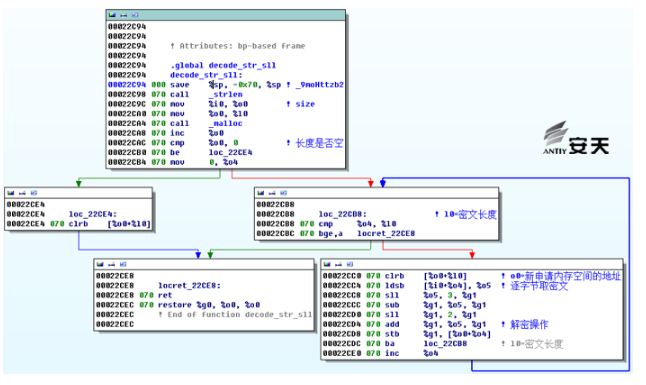
Figure 17 Another Decryption Algorithm
See the table below for the decrypted content:
| Offset | Plain Text | Offset | Plain Text |
| 0x13c12 | ‘www.google.com’ | 0x1439b | ‘ntp’ |
| 0x13d11 | ‘www.yahoo.com’ | 0x143ac | ‘mail’ |
| 0x13e32 | ‘\x91 xxx atech.com’ | 0x143bd | ‘mysql’ |
| 0x14034 | ‘\\X’ | 0x143cd | ‘named’ |
| 0x1406c | ‘\\’ | 0x143db | ‘sys’ |
| 0x140e7 | ‘\x91puX;\xc7;\xc7Xupp\x8dTq \x01{User-Agent: Mozilla/5.0 (X11; U;Solaris; en-US; rv:1.7.5) Gecko/20041111 Firefox/1.0\r\n’ | 0x143ec | ‘smtp’ |
| 0x1419d | ‘Accept: image/png | 0x143fe | ‘nobody’ |
| 0x14314 | ‘”‘ | 0x1440c | ‘auth’ |
| 0x1437e | ‘daemon’ | 0x1441a | ‘LP’ |
| 0x1438b | ‘adm’ | 0x1442c | ‘UUCP’ |
4.3.4 Network Communication Encryption
The custom algorithm used in the Solaris sample is the same as that used in the Windows sample, but only one encryption key is used (because the Solaris system does not have a registry, so it does not have registry encryption functionality). This key is the same as the key used to encrypt registry data on the Windows platform. The custom encryption algorithms used on both platforms are the same (for details, please refer to section 3.1.6, Encryption Algorithm Analysis).
Analysis using Antiy CERT revealed the original 16-bit key as:
66 39 71 3c 0f 85 99 81 20 19 35 43 fe 9a 84 11
, which is 16 bytes long and the same as the original 16-bit key length for Windows.
Since the algorithms for generating network communication subkeys are the same in Solaris and Windows samples, the following subkeys can be generated:
E9 BE CD E0 A8 9F 4D DB C3 42 AC 2B 24 77 AB CB 5A C1 52 F8 5B 3E F0 78 CB 01 0A 69 29 8F 85 8C 03 9C 7C EF 5E 36 0E 8B C0 40 76 28 9C F2 24 81 9D 02 72 4F 6A BB B5 5B 42 73 14 88 F2 73 75 8B F9 37 98 3B 9F 64 2B A3 C4 FF C7 8A 40 67 C1 25 9F 65 54 45 36 48 FF E2 86 05 1A F4 94 AC 2B 08 D5 E5 83 BE 2C AD EE D0 A6 98 CB 8D 35 ED EE C4 F0 8C F2 CD BA 87 03 54 27 3D 13 A7 9B 6A 05 C7 02 30 21 05 67 58 3B E6 A1 44 0A 37 16 3C 86 E9 BC 8B 20 1A 98 7E 28 E6 7F F7 CA F7 9E 38 31 7F F0 2F 93 11 2B 28 F0 FF 11 B7 FC 1C 63 86 CB
This subkey is used for encrypting and decrypting data sent and received.
4.3.5 Network Control Commands
Our analysis of the Solaris sample revealed that it has fewer instructions than the Windows sample. The Solaris platform has only seven instructions, while its functionality is roughly the same as Windows. Below is a comparison diagram of the two platforms in IDA. Multiple diagrams show that the Solaris sample has significantly fewer instructions and a much simpler structure than the Windows sample.
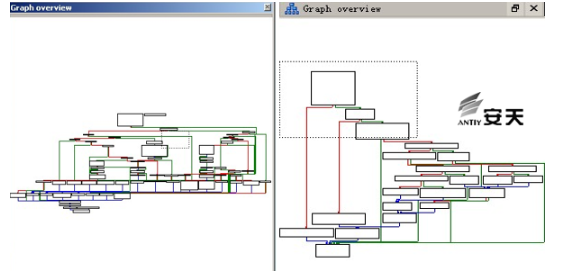
Figure 18 Comparison of Network Command Structures on Windows and Solaris Platforms
The command functionality of the Solaris sample is not implemented in the figure above. Initially, we thought that the command functionality of the Solaris sample was not yet complete. However, after further analysis, we found that the Solaris sample uses a special dynamic calculation method to jump to different command branch codes. The red part in the figure below is the command branch that jumps to after dynamic calculation.
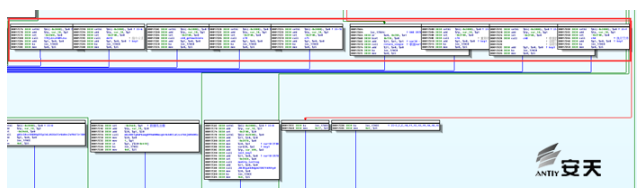
Figure 19 Solaris Instruction Branch Functions
The functions of each command in the Solaris sample are briefly described below, and their general functions are the same as those of Windows commands:
| Hexadecimal Instruction Codes | Command Function |
| 0x42 | Clean up traces of infection and delete itself |
| 0x 4A | Create file |
| 0x44 | Write to file |
| 0x 56 | Execute file |
| 0x4B | Read file and return |
| 0x60 | Collect and send back a large amount of information (see the table below for specific format). |
| 0x70 | Update sample configuration information |
| 0x75 | Update sample sleep time and re-collect information for transmission. |
| 0x76 | Update C&C server address |
The download and execution portion of the sample is similar to that in Windows, using the same instruction tags and completing the download and execution function through three steps (create, write, execute). The only difference lies in the code structure; Solaris integrates these three instructions into a single function.
When executing the file, file privileges are first elevated, and then the `execle` function with parameters is used to execute the file.
Parameter 1: Path to file B
Parameter 2: Filename B or “sendmail” (presumably related to mail)
Parameter 3: 0
Parameter 4: PATH=%PATH% (environment variable)
For example: `execle(“/usr/bin/sample”,”sample”, NULL, %envp%);`
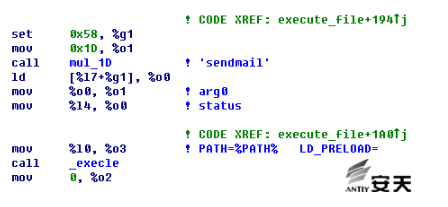
Figure 20 Executable file parameters
The Solaris sample command functions and data packet formats are the same as the Windows sample. Detailed descriptions of command functions and data packet formats can be found in the command analysis of the Windows platform sample.
The system information collected under the Solaris sample differs slightly from that under Windows, as detailed below:
| Computer Name | HostID | MAC Address | IP Address | Username | Typically User’s Full Name |
| User UID/GID | System hardware architecture information | System detailed time | The system’s default language type | Current program running path | System process information |
5. Summary
5.1 Driving Improvements in China’s Cybersecurity Capabilities Through Real-World Threats
Antiy hopes to demonstrate to Chinese users through its work that the various reports about super-attack organizations’ full-platform coverage capabilities are not just rumors, but a real threat and an established fact. This weapon is used not only to attack traditional high-level targets within isolated networks, but also to attack internet nodes.
In China’s security defense practices, there is a preconceived notion that due to various regulations and constraints, nodes exposed to the internet, and even internal networks with internet access, do not store high-value information. “All valuable information resides within isolated networks”—this is a beautiful vision and imagination, but not the reality in this era of massive information generation and rapid flow. Furthermore, in the era of big data, the definition and scope of high-value information are constantly changing. More information assets are inevitably distributed within public network systems. And the spying and attacks on these assets are continuously increasing. Super-attack organizations are the instigators and long-term practitioners of such attacks.
Intrusion into DNS servers can assist in the injection of malicious code and information hijacking into other network targets; implantation into mail servers can capture all of a user’s email communications; and persistence of operator backbone nodes can be used to obtain comprehensive information, including the kind of “easy victory” mentioned in the Camberdada[14] plan.
Note: Note: Operation Camberdada is a surveillance program exposed by Edward Snowden. Through persistent nodes installed on telecommunications carriers’ networks, the agencies involved monitored emails sent by users to antivirus vendors to determine whether their attacks had been compromised, and to capture and reuse malware samples deployed by other parties.
The security myth of “physical isolation” has also reached a point where it must be debunked. In his April 19 speech, General Secretary Xi Jinping warned domestic users and cybersecurity professionals: “The ‘physical isolation’ defense can be breached across networks, power dispatch instructions can be maliciously tampered with, and financial transaction information can be stolen—all of these pose significant risks”. Meanwhile, China’s vast yet vulnerable digital infrastructure faces opponents armed to the teeth. The scale of the attack payload’s code engineering, the meticulous design of the operational chain, and the comprehensive, seamless platform coverage all demonstrate the unprecedented attack capabilities of super-attack groups like the Equation Group. Furthermore, according to disclosed information, the group’s multi-year attacks targeting a large number of critical targets also reveal its unwavering determination to carry out such operations. In previous research, Antiy has referred to organizations with similar attack capabilities as A2PT and has proposed several evaluation criteria for A2PT from the perspective of malicious code payloads. These criteria align closely with the behavior and capabilities of the Equation Group.
| Characteristics of A2PT Summarized by Antiy | Characteristics of Formula-Based Attack Equipment and Operation Methods |
| Sufficient 0-day reserves | Fanny exploited the LNK 0-day vulnerability and the MS09-025 vulnerability |
| The load-bearing components are highly complex and highly modular. | Highly complex and modular EquationDrug and GrayFish attack components |
| Local encryption resists analysis; network communication is strictly encrypted and disguised. | Configure data resource encryption Registry, network communication encryption |
| Multiple implantation methods | Network intrusion Logistics hijacking (speculation) On-site implantation by personnel (speculation) |
| The use of fileless carrier technology is widespread. | Bootkit startup Registry stores samples, decrypts in segments |
| Persistence extends in depth (firmware) and in breadth (firewalls, email gateways, lateral movement within a LAN). | Hard drive firmware modification Firewalls and other network security devices implanted Persistence for mail servers |
| Complete coverage of all operating system platforms (including mobile). | Samples exist for Windows, Linux, Solaris, and OS X. |
As we have summarized before, the relevant super attack organizations have organized network attack teams, a huge supporting engineering system and a standardized attack equipment library, strong vulnerability collection and analysis mining capabilities and related resource reserves, as well as systematic operating procedures and manuals, with the characteristics of equipment system covering all scenarios, vulnerability exploitation tools and malicious code payloads covering all platforms, and persistence capabilities covering all aspects. Faced with such systematic attacks that are both industrial-grade and highly targeted, the perpetual motion machine is destined to stop and the silver bullet is destined to be silenced. In order to achieve the defensive effect and realize the tracing of the source, we must use a clear strategy, sufficient cost investment, and systematic defense to confront systematic attacks[15], and gradually gain the initiative through long-term hard work and solid capacity building.
5.2 Our Efforts and Our Hope for Close Collaboration with Capable Vendors
Since 2010, Antiy has conducted in-depth analyses of advanced threat operations or groups such as Stuxnet, Duqu, Flame, APT-TOCS (OceanLotus), White Elephant, Ukraine Blackout, and Equation, publishing hundreds of pages of analysis reports. Undoubtedly, the capabilities of advanced threat detection products are continuously improved through a solid and effective analysis process. Antiy has released a product system for advanced threat detection and situational awareness: Antiy’s Persistent Threat Detection System improves the depth and capability of threat detection on the user traffic side; Antiy’s Intelligent Endpoint Protection System provides users with various defense strategies, including “whitelist + security baseline”; Antiy’s Persistent Threat Analysis System provides users with the ability to deeply analyze threat payloads through dynamic and static methods; Antiy has also played a key role in the construction of situational awareness and early warning platforms in multiple industries and departments, providing overall design support, development integration, and supplying key detection and analysis capabilities.
Antiy considers next-generation threat detection engines, highly customized sandboxes for various scenarios, interactive visual analysis for assets and threats, and knowledge and intelligence support as the core elements for achieving effective user value.
However, Antiy also objectively recognizes that facing the formidable capabilities, unwavering resolve, and unimaginable costs of attacks from super-aggressive organizations, no single vendor can effectively accomplish its mission alone. Therefore, Antiy has consistently advocated for active collaboration and mutual recognition of capabilities among security vendors, alongside its industry peers. In its previous analysis and response to a cyberattack originating from the South Asian subcontinent, although Antiy named the incident “White Elephant” and 360 Enterprise Security named it “Mahagrass”, both companies effectively exchanged information and mutually recognized each other’s analytical findings during the report’s development. This is a good start, and we believe that similar collaborations among capability-based security vendors will become increasingly common.
5.3 Looking Forward to a Safer Online World
Currently, the comprehensive coverage capabilities of super-attack organizations have triggered global users’ security anxiety, leading to a sense that “nothing can be trusted”. Last year, some domestic media reports on the Equation Group attack interpreted the attackers’ persistent implantation of malware into the firmware of high-value target nodes’ hard drives as a backdoor in mainstream hard drives. While this is certainly a misunderstanding, it cannot be denied that when a super-attack organization’s capabilities reach a level that can only be speculated upon and imagined, it is impossible not to cause panic, leading to serious doubts about superpowers “abusing their supply chain and information flow advantages“.
Recent leaks of Equation Model attack code and the earlier exposure of the “ANT” weapon system have highlighted the possibility that related exploit reserves and attack strategies could flow into cybercrime organizations and even terrorist groups. Given the extremely low cost of replicating cyberattack techniques, a serious risk of cyber arms proliferation already exists. Therefore, the ability of superpowers to reasonably control the speed and scale of their own cyber arms development, and to effectively intervene and control potential arms proliferation in the cyber domain due to their failure to fulfill their responsibilities, is a key factor in achieving a more secure cyber world.
We look forward to a safer online world, and we will work towards that goal!
Appendix 1: References
[1] Antiy: Trojans that modify hard drive firmware explore the attack components of the Equation group
https://www.antiy.com/response/EQUATION_ANTIY_REPORT.html
[2] Antiy: Analysis of encryption techniques in some components of Equation
https://www.antiy.com/response/Equation_part_of_the_component_analysis_of_cryptographic_techniques.html
[3] 2016 China Cybersecurity Conference
http://2016.cert.org.cn/
[4] 2016 Alibaba Security Summit
https://security.alibaba.com/securitySummit.htm
[5] Antiy: Panda’s Scars – APT Attacks Encountered in China
https://www.antiy.com/presentation/Panda’s_Scar.pdf
[6] Equation Group Cyber Weapons Auction – Invitation
https://github.com/theshadowbrokers/EQGRP-AUCTION
[7] Shadow Brokers reveals list of Servers Hacked by the NSA
http://thehackernews.com/2016/10/nsa-shadow-brokers-hacking.html
[8] Kaspersky: Equation: The Death Star of Malware Galaxy
http://securelist.com/blog/research/68750/equation-the-death-star-of-malware-galaxy/
[9] Kaspersky: A Fanny Equation: “I am your father, Stuxnet”
http://securelist.com/blog/research/68787/a-fanny-equation-i-am-your-father-stuxnet/
[10] Kaspersky: Equation Group: from Houston with love
http://securelist.com/blog/research/68877/equation-group-from-houston-with-love/
[11] Kaspersky: Equation_group_questions_and_answers
https://securelist.com/files/2015/02/Equation_group_questions_and_answers.pdf
[12] SPARC architecture
https://en.wikipedia.org/wiki/SPARC
[13] Solaris system
https://en.wikipedia.org/wiki/Solaris_(operating_system)
[14] An Easy Win: Using SIGINT to Learn about New Viruses
[15] Huang Sheng: Thoughts on Network Defense in Depth
https://www.antiy.com/wtc/2015/02_Joe.pdf